
Online platforms provide convenient options for editing PDF files without downloading specific software. These specialised websites offer a range of resources to modify the text, insert images, and even add digital signatures to your documents.
It’s important to note that not all PDF files can be edited similarly. While digital documents containing text and images offer more customisation options, certain tools may not be compatible with scanned pages.
In such cases, it is advisable to prioritise files intended for viewing on computers, smartphones, and tablets, as they are more likely to support editing functionalities provided by online platforms.
How To Edit PDF Online Free
In Adobe Acrobat
While the browser version of Adobe Acrobat restricts several editing features to its paid subscription, there are still options available for annotating and converting files to JPG on the website. These features provide some flexibility for users even without a subscription.
- Go to acrobat.adobe.com/link/acrobat/ ;
- Upload the document;
- Use the side panel to add comments;
- Export the final result.

In Canva
Canva’s versatility extends to PDF files as well. It offers the functionality to import PDF documents and provides a wide range of text and image editing tools for you to utilise. Let’s explore how you can take advantage of these features on the platform.
- Go to canva.com ;
- Select “Create a design”;
- Click “Import” to Add the PDF file;
- Start editing it with Canva’s tools;
- Click on the text to change it and use the side menu to add more information;
- Select “Share” and choose how you want to save the document.

In ILovePDF
ILovePDF is a comprehensive tool designed to address a range of issues related to PDF files. It offers many features beyond basic editing, such as file compression, text or image conversion, page cropping, and the ability to insert signatures, among other options. With iLovePDF, you can efficiently manage and enhance your PDF documents.
To edit, follow these steps:
- Go to https://www.ilovepdf.com/edit-pdf ;
- Select the file;
- Use the toolbar to add new information;
- Click “Done” to save the new version.

In Sejda
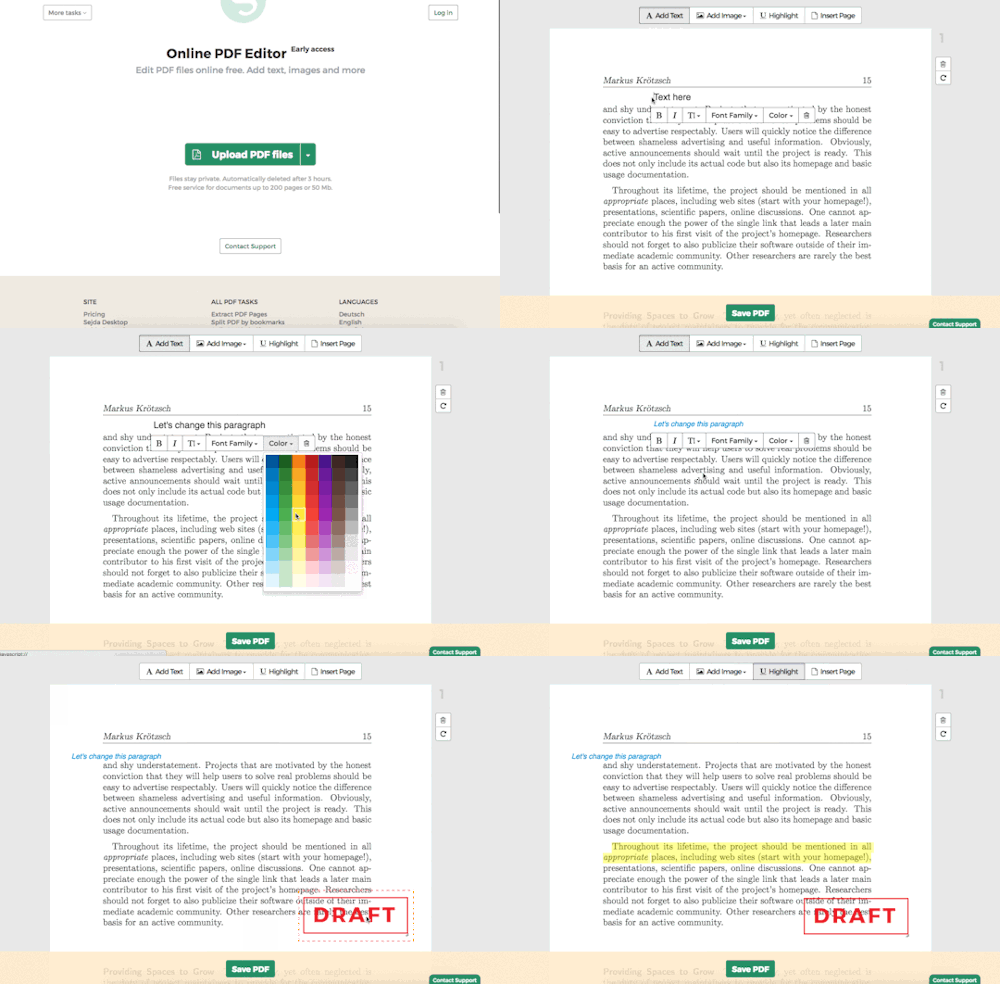
Sejda serves as a versatile PDF file editor and converter. Its free version allows users to access over 20 tools, offering various functionalities such as document compression and page exclusion. Here’s a step-by-step guide on how to edit your PDF using Sejda:
- Go to https://www.sejda.com/pdf-editor ;
- Upload the document in PDF;
- Click on the text to select passages and change them;
- Use the top menu to add other features like images and annotations;
- Press “Apply Changes” and save the modified file.
In conclusion, the world of PDF editing has undergone a remarkable transformation, making it easier than ever to modify these files online and free of charge. Thanks to various online tools and platforms, individuals can now change their PDF documents without expensive software or extensive technical expertise.
Throughout our exploration, we’ve delved into several popular options, including Canva, ILovePDF, Sejda, and the browser-based version of Adobe Acrobat. Each platform offers unique features and functionality, empowering users to perform tasks such as text editing, image insertion, file compression, format conversion, and more.
While some advanced editing features may require a paid subscription, numerous valuable tools are still available at no cost. These online solutions enable individuals and businesses to make necessary adjustments to their PDF files, whether adding annotations, cropping pages, or inserting signatures.
With just a few clicks, anyone can now modify their PDF documents, transforming this once-complex task into an accessible and valuable resource for professionals, students, and individuals across various fields of endeavour.