Microsoft is making a small but practical change to Microsoft Teams on Windows 11, relocating the “Exit” command to prevent users from accidentally closing the app during meetings.
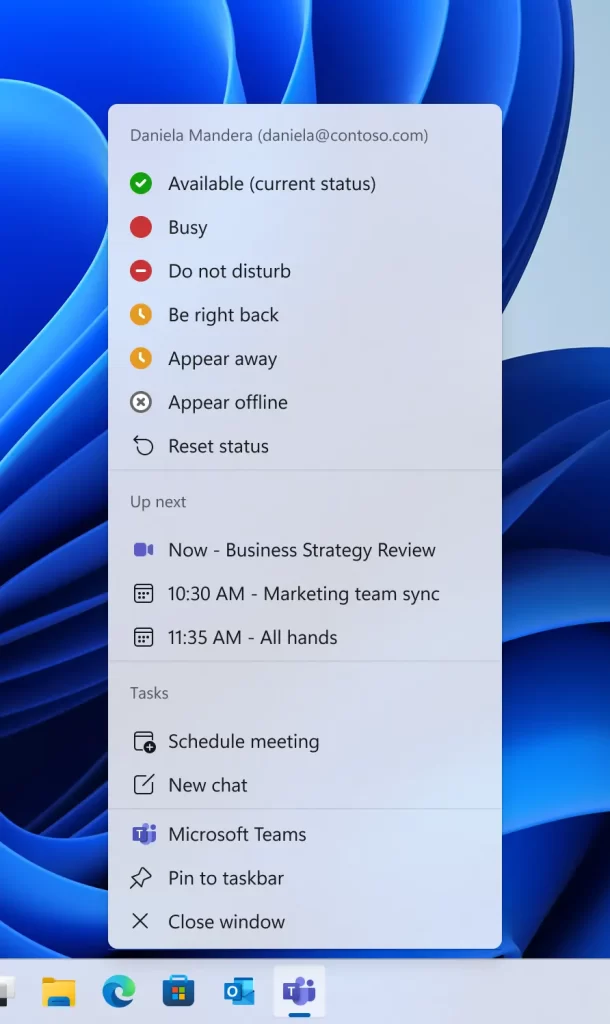
The update focuses on the Jump List-the menu that appears when users right-click the Teams icon on the Windows taskbar.
What’s changing
Under the new design, the Exit option will no longer appear in the taskbar Jump List. Instead, users who want to fully close Teams will need to access the command from the app’s icon in the system tray (notification area).
At the same time, Microsoft is expanding the Jump List to include more productivity-focused shortcuts, such as:
- Viewing upcoming meetings
- Joining a meeting with one click
- Starting a chat
- Scheduling a meeting
The adjustment is intended to make quick actions more accessible while reducing the risk of unintentionally shutting down the app in the middle of a call.
Why the change matters
As Teams has evolved into a central hub for messaging, meetings, calendars and collaboration, accidental closures can disrupt calls and workflows. Microsoft’s internal guidance already treats the system tray as the primary location for fully exiting the application, making the redesign a shift toward consistency.
The change reflects a broader effort to make Teams more operational from the Windows interface-allowing users to perform everyday tasks quickly without opening the whole application window.
Adjustment period expected
While the update may prevent unintended call interruptions, it could require some adjustment for experienced users accustomed to closing Teams via the taskbar’s right-click menu. In corporate environments, where user habits and documentation often lag behind interface changes, help desks may see a temporary increase in support queries.
The move is part of a series of incremental improvements Microsoft has introduced to Teams in 2026, aimed at refining usability and supporting continuous, multitasking workflows.
Though minor, the relocation of a single button highlights how small interface changes can have a significant impact on daily productivity-especially for software that has become a core workplace communication tool.