After a shaky start to the year marked by problematic updates and user frustration, Microsoft is preparing a more measured step forward for Windows 11. The February 2026 Patch Tuesday update is shaping up to be less about bold reinvention and more about refinement-introducing practical features that address long-standing pain points in continuity, security, performance, and accessibility.
According to Windows Central, the update is scheduled to begin rolling out on Tuesday, February 10, 2026. It targets both Windows 11 24H2 and 25H2, with the same feature set delivered to each version. As has become standard practice, many of the changes will roll out gradually through Microsoft’s Controlled Feature Rollout (CFR) system, meaning not every user will see all features on day one.
Cross-Device Resume Brings Better Continuity Between Phone and PC
One of the most notable additions is Cross-Device Resume, a feature designed to strengthen continuity between Android phones and Windows PCs. The concept is straightforward: Windows 11 will allow users to resume certain activities from their mobile device directly from the taskbar on their PC.
In real-world terms, this could mean continuing music playback from Spotify, reopening documents you were editing on your phone, or resuming web browsing sessions without manually retracing your steps. Microsoft is also testing deeper integrations tied to specific mobile apps, including file continuity when opening content from the Copilot app on supported Android devices. While compatibility will vary by app and phone manufacturer, the update signals Microsoft’s intent to make Windows feel less isolated from mobile workflows.
Windows MIDI Services Get a Modern Overhaul
The February update also includes improvements aimed at musicians and audio professionals through updated Windows MIDI Services. MIDI, the long-established standard that allows musical instruments, controllers, and software to communicate, is receiving enhanced support for both MIDI 1.0 and MIDI 2.0.
Microsoft is introducing internal translation layers and performance optimizations to reduce latency and improve reliability. Importantly, advanced MIDI tools will be offered as an optional separate download, ensuring that everyday users are not burdened with unnecessary components while professionals gain access to more capable tooling.
A Clearer View of Your PC in Settings
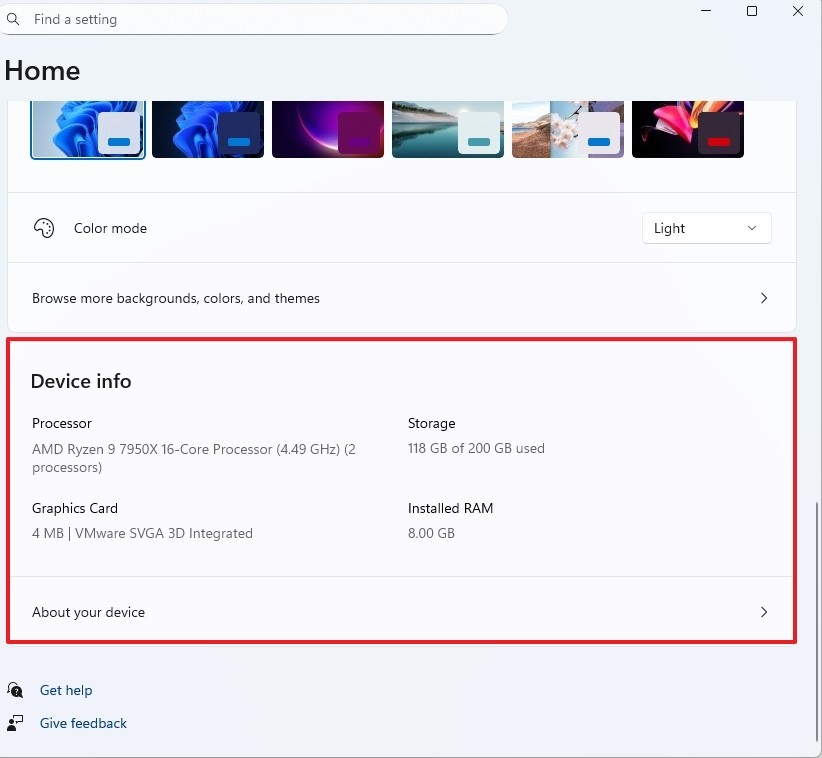
In the Settings app, Microsoft is adding a new “Device information” card that provides a concise summary of essential hardware details. At a glance, users can see their CPU, RAM, graphics configuration, and storage, with a direct link to the full “About” page for deeper system information.
While small, this change addresses a common annoyance for users troubleshooting performance issues or preparing system details for support requests. It reduces unnecessary navigation and brings critical information closer to the surface.
Security Improvements With Less Friction
Two changes in February aim to make Windows security more flexible and less disruptive.
Smart App Control, the feature that restricts apps to trusted sources, is becoming easier to manage. Previously, disabling the feature after enabling it required a full Windows reinstallation. With the new update, users can turn Smart App Control on or off directly from Windows Security without reinstalling the operating system-a long-requested improvement.
At the same time, Windows Hello Enhanced Sign-in Security (ESS) is expanding support for external fingerprint readers. Until now, ESS was largely limited to built-in biometric sensors. The update allows compatible external fingerprint readers to work with Windows Hello, closing a long-standing gap for desktop users and enterprise setups.
Performance and Accessibility Tweaks That Add Up
Several changes focus on areas users interact with daily, even if they often go unnoticed.
File Explorer gains improved responsiveness when navigating network locations, addressing sluggish behavior that has frustrated users working with shared folders and remote paths. While not a headline feature, this adjustment targets a problem that has persisted for years.
Voice Access, Windows’ voice control system, now includes a setup wizard that guides users through downloading language models, selecting microphones, and completing initial configuration. By reducing setup friction, Microsoft hopes more users will actually adopt the feature.
Voice Typing also receives a practical enhancement: users can now configure a delay before spoken commands are executed. Options range from instant to extended delays, making dictation more forgiving for those who pause, rethink phrasing, or want to avoid premature command execution.
Availability and What to Expect on Day One
The update has already appeared in the Release Preview channel of the Windows Insider Program and will move to the stable channel in February. Users eager to receive features early can enable the option to “receive the latest updates as soon as they are available,” though Microsoft continues to recommend caution to avoid potential undiscovered issues during the initial rollout phase.
Overall, the February 2026 update reflects a quieter but more deliberate direction for Windows 11. Instead of chasing dramatic changes, Microsoft appears focused on smoothing rough edges-improving continuity, reducing security friction, and refining core experiences that affect daily use. For many users, that kind of progress may be exactly what Windows needs right now.