On TikTok, Collections are a practical way to organise your favourite videos, functioning much like folders. Instead of keeping all saved videos in one long list, collections let you group content by theme, interest, or purpose. By default, collections are private, but TikTok also allows you to share them with friends or family members, making it easy to save and manage videos together.
With shared collections, everyone who has access can add new videos, rename the collection at any time, and decide whether it remains private or becomes public. This makes the feature especially useful for collaboration, whether you’re gathering ideas, planning activities, or simply sharing content around a common interest.
Beyond organisation, collections are helpful for saving videos you want to revisit later, organising inspiration, or planning projects. For example, you could create a collection for weekend recipes, travel ideas, workout routines, home décor inspiration, or gift ideas. Everything stays neatly organised and easy to find whenever you need it.
How to create a collection on TikTok
Before you can create a collection, you must first save at least one video to your favourites. Once you’ve done that, follow these steps:
- Open TikTok and tap Profile in the bottom-right corner.
- Tap the saved videos icon (the bookmark symbol).
- Select the Collections tab.
- Tap Create collection.
- Give your collection a name, add friends if you want to make it shared, and tap Next.
- Choose the videos you want to add to the collection.
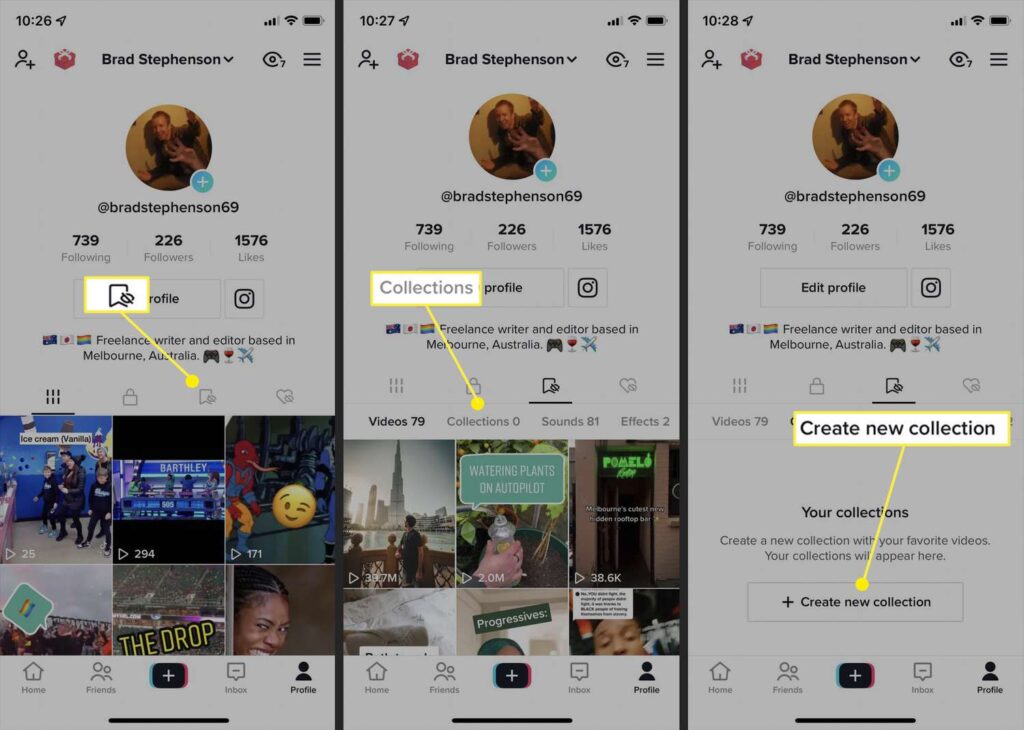
You can add or remove videos at any time, and you’re free to rename the collection whenever you like.
Who can you invite to a collection?
TikTok only allows shared collections between users who follow each other. This means both you and the other person must be mutual followers. In addition, the feature is restricted to users who are 16 years old or older.
Once invited, participants can contribute by saving videos to the shared collection, helping everyone keep relevant content in one place.
How to delete a collection on TikTok
If you no longer need a collection, deleting it is quick and easy:
- Open your TikTok profile.
- Tap the saved videos icon.
- Go to Collections.
- Select the collection you want to remove.
- Tap Manage.
- Choose Delete collection and confirm by tapping Delete.
Deleting a collection removes the folder itself but does not delete the original videos from TikTok.
Collections are a simple yet powerful tool for staying organised on TikTok, whether you’re saving content for personal use or collaborating with others around shared interests.