Long before Windows evolved into a layered ecosystem of widgets, notification panels, and overlapping design languages, efficiency often meant having commands and indicators immediately within reach.
In that regard, operating systems such as Linux and macOS have long held an advantage with their persistent top bars-static anchors for controls, status information, and quick actions. Microsoft now appears ready to revisit that idea, not by reshaping Windows 11 itself, but by experimenting at the edges through PowerToys.
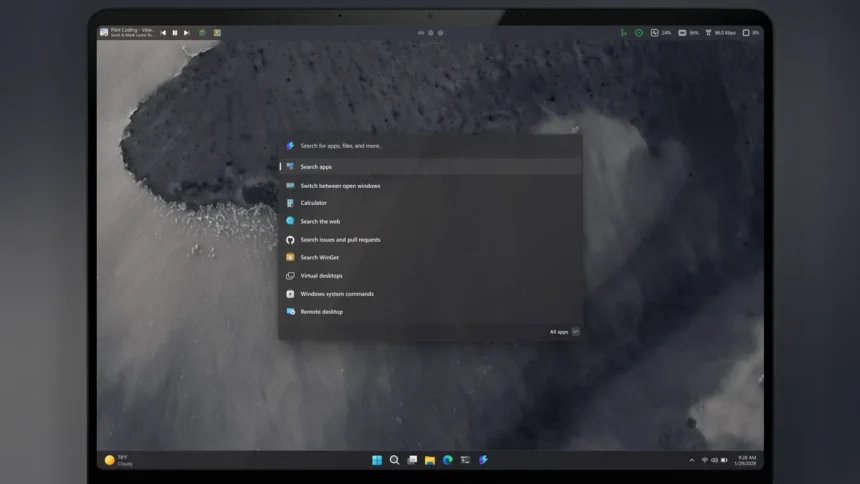
The PowerToys development team is currently exploring a new feature that would introduce a configurable menu bar that can sit at the top of the desktop-or anywhere else the user prefers. Internally referred to as the Command Palette Dock, the concept is being developed as an optional extension of the Command Palette, PowerToys’ advanced launcher and command interface.
An Optional Layer, Not a System Overhaul
According to documentation published on GitHub, Microsoft is careful to stress that this dock is not meant to replace any existing Windows interface elements. Instead, it adds an additional surface aimed at advanced users who want faster access to tools, controls, and information.
Once enabled through the Command Palette settings, the dock would allow users to pin extensions directly to a slim bar. Rather than opening the full launcher, a single click on an extension icon would display its interface in a floating flyout panel, reusing the same UI components already built into the Command Palette. The result is a lightweight, always-available control strip that avoids interfering with Windows 11’s taskbar or system tray.
A Modular Design With Multiple Zones
One of the more notable aspects of the proposal is that the system is not limited to a single, fixed bar. The dock is designed to be modular and highly configurable, with three distinct zones-start, center, and end-where extensions can be placed. Users would be able to rearrange items using an edit mode and customize visual elements such as background, theme, and overall style to better match their desktop setup.
Microsoft has emphasized that existing PowerToys extensions would work without modification, suggesting the dock is intended as a practical addition rather than a proof-of-concept experiment. In effect, it acts as a new presentation layer for functionality that already exists.
New Opportunities for Developers
If the feature moves forward, developers may gain new ways to extend PowerToys. The team has referenced a potential new extension hook-ICommandProvider3::GetDockBands()-that would allow creators to design custom buttons or interactions specifically for the dock. Microsoft has also made it clear that developers can already test the feature by creating a specific branch in the PowerToys repository in Visual Studio.
Beyond the visual resemblance to Linux and macOS, the more significant takeaway is strategic. Microsoft appears increasingly interested in offering optional, modular layers for power users without forcing disruptive redesigns on the broader Windows audience. Rather than rethinking the Windows shell itself, the company is using PowerToys as a sandbox for ideas that emphasise efficiency, customisation, and user choice.
Whether the Command Palette Dock becomes a polished feature or remains an experiment, it reflects a growing willingness within Microsoft to let Windows evolve through opt-in enhancements-quietly borrowing good ideas from elsewhere, without rewriting the operating system’s core.