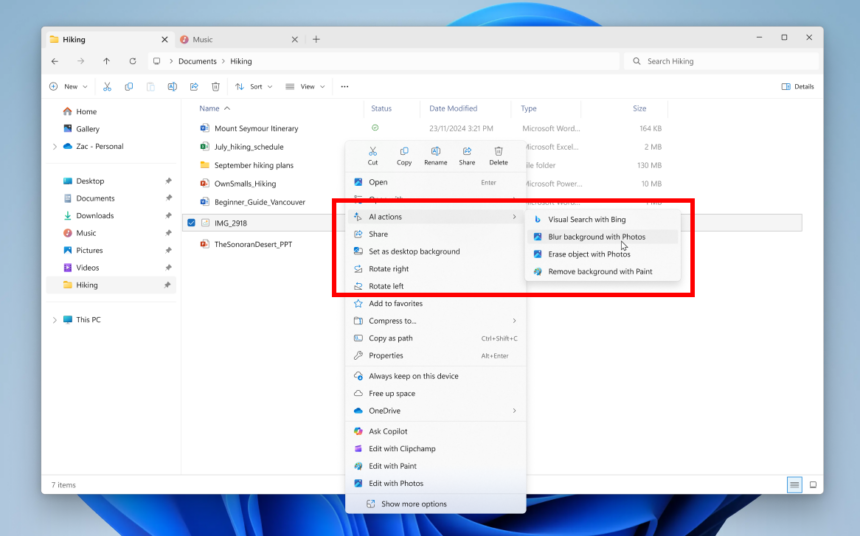
Microsoft’s aggressive push to integrate AI features throughout Windows 11 has drawn steady criticism in recent months, particularly regarding how those tools are implemented in everyday workflows. While the company hasn’t publicly addressed the backlash, a recent change in Windows 11 Insider Preview Build 26220.7344 (KB5070316) suggests it’s beginning to listen-at least in small but meaningful ways.
The update, now rolling out to the Dev and Beta Channels, introduces a new degree of control over AI Actions in the right-click context menu, making the experience less intrusive for users who don’t want AI integrated into every interaction.
AI Actions Are No Longer Forced Into Every Right-Click Menu
In earlier builds, the AI Actions section appeared in the context menu, regardless of whether any AI-powered capabilities were actually available. That behaviour has now changed.
In the latest build:
- If Windows doesn’t detect any enabled AI Actions, the entire AI Actions section disappears from the context menu.
- Users can disable multiple AI Actions at once by navigating to:
Settings > Apps > Actions - From there, AI features tied to apps such as Paint, Photos, and Microsoft Teams can be toggled off individually or altogether.

This behaviour was first spotted by a Reddit user and later confirmed by broader testing in the Insider community.
Still Not Perfect: The “Ghost” AI Actions Label
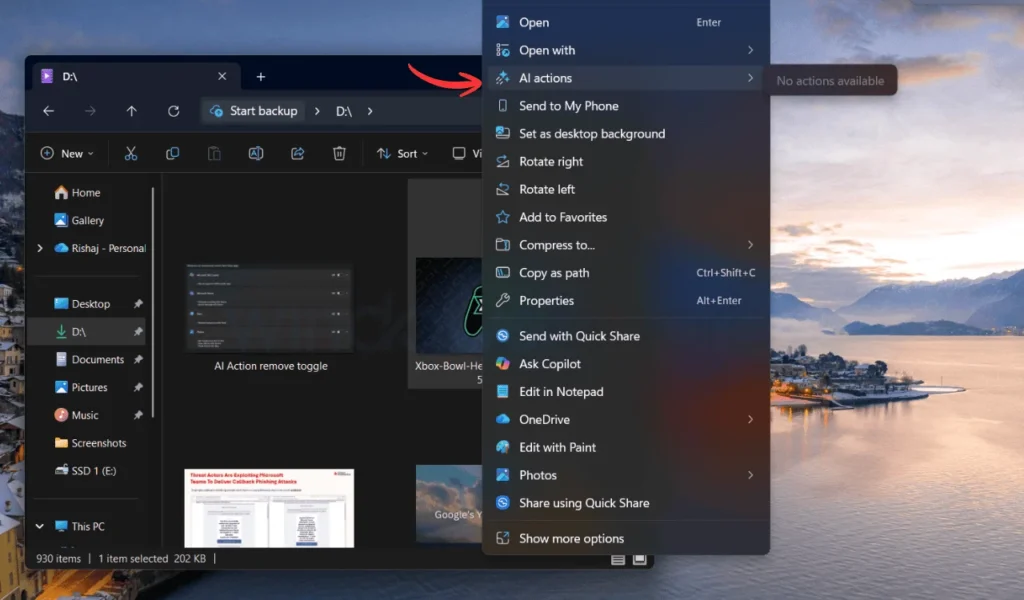
While the change is a step forward, it doesn’t fully resolve user complaints. In some cases, even after AI Actions are disabled, the AI Actions label can still appear in the context menu, serving as an empty category with no functional actions-essentially occupying space without adding value.
Many users argue that if all AI-related features are turned off, the category itself should be removed entirely rather than remaining as a placeholder. Given how frequently Windows 11’s context menus are already criticised for clutter, the remaining label stands out as an unfinished solution.
Why Users Pushed Back on AI Actions
Right-clicking an image or file in Windows 11 often surfaces AI-powered options such as background removal, editing suggestions, or app-specific actions. While useful for some, the feature has drawn criticism for several reasons:
- The AI options often just launch apps users could open via the traditional “Open With” menu
- They add extra noise to already crowded context menus
- Not all users want AI-driven workflows baked into basic file operations
For power users, photographers, developers, and those who prefer minimal interfaces, the forced presence of AI Actions felt unnecessary rather than helpful.
This small adjustment may signal a larger shift in Microsoft’s thinking. During a recent WinUI Community Call, the company discussed plans for a new split-view context menu design, aimed at:
- Reducing visual clutter
- Grouping actions more intelligently
- Giving apps clearer structure when offering multiple actions
If implemented, this redesign could finally address one of the most persistent complaints about Windows 11 since its launch.
More UI Cleanup on the Horizon
The context menu change isn’t happening in isolation. Microsoft is also working on other long-requested UI refinements, including:
- A long-overdue visual redesign of the Run dialog, unchanged for over 30 years
- Continued attempts to unify Windows 11’s design language
- Reductions in legacy UI inconsistencies across system tools
While this update doesn’t completely eliminate AI Actions from Windows 11, it represents a rare moment where Microsoft has quietly backed away from forcing AI features on users. Giving people the ability to remove AI Actions entirely-without hacks or registry edits-is a meaningful concession.
If future builds continue in this direction, Windows 11 may finally strike a better balance between AI innovation and user choice-something many in the community have been asking for all along.