

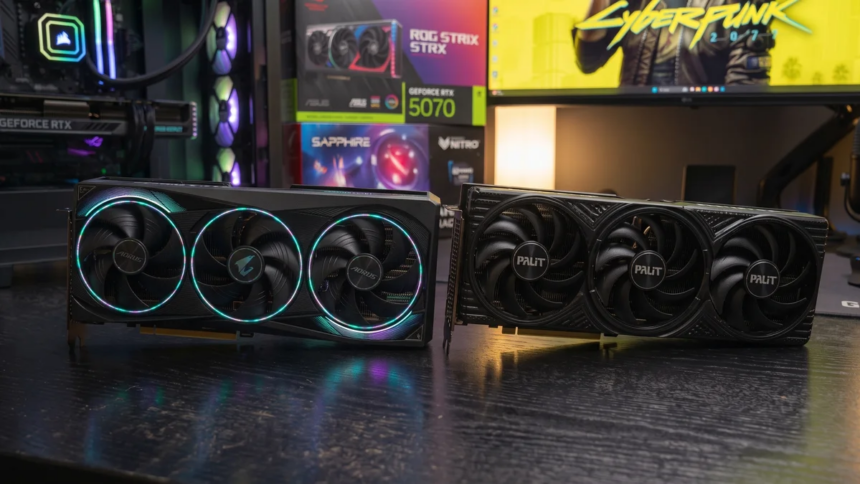
For many PC gamers, 1440p (2560×1440) has become the ideal gaming resolution. It delivers noticeably sharper visuals than 1080p while avoiding the demanding hardware requirements of native 4K. When paired with high-refresh-rate monitors, it offers an excellent balance between image quality and performance.
However, as modern game engines like Unreal Engine 5 become more common, GPU memory requirements have increased significantly. High-resolution textures, ray tracing, and advanced lighting effects consume more video memory than ever before. As a result, one of the biggest questions among PC gamers is whether 8GB of VRAM is still enough for 1440p gaming, or if upgrading to a graphics card with 12GB or 16GB is the smarter choice.
In this guide, we’ll explain why 1440p demands more VRAM than 1080p, how modern graphics technologies affect memory usage, and which VRAM capacity offers the best experience for today’s games.
Why Does 1440p Require More VRAM Than 1080p?
The jump from 1920×1080 to 2560×1440 increases the number of rendered pixels by approximately 77.7%. That extra workload doesn’t just affect GPU performance. It also increases the amount of video memory required to render each frame.
Several components contribute to higher VRAM usage at 1440p.
Larger Frame Buffers
Every frame rendered by the GPU stores color, depth, and transparency information inside frame buffers and depth buffers. Since 1440p renders significantly more pixels than 1080p, these buffers require considerably more memory.
Higher-Resolution Textures
Modern games use detailed texture packs that improve visual quality. At 1440p, these textures appear much sharper, but they also occupy more VRAM than lower-resolution assets.
Advanced Visual Effects
Features such as dynamic shadows, ambient occlusion, screen-space reflections, volumetric lighting, and other post-processing effects all increase memory usage. Higher resolutions require these effects to process more pixels, further increasing VRAM consumption.
Is 8GB of VRAM Enough for 1440p Gaming?
The answer depends on the type of games you play.
If your library mainly consists of esports and competitive multiplayer titles, 8GB of VRAM is still sufficient. Games like:
- Valorant
- Counter-Strike 2
- League of Legends
- Overwatch 2
run comfortably at 1440p because they have relatively modest memory requirements. Older AAA games and many indie titles also perform well on an 8GB graphics card.
The situation changes when running recent AAA releases.
Modern games built on current-generation engines often exceed 8GB of VRAM, even at medium or low graphics settings. According to the source material, titles such as:
- Alan Wake 2
- Resident Evil: Requiem
- Horizon Forbidden West
can surpass the available memory capacity at 1440p.
When this happens, the GPU begins using system RAM as overflow memory. While this allows the game to continue running, performance often suffers.
Common symptoms include:
- Frequent stuttering
- Inconsistent frame times
- Texture pop-in
- Blurry textures
- Reduced overall smoothness
Even if the graphics processor itself is powerful enough to handle the workload, limited VRAM can become the primary performance bottleneck.
How Ray Tracing Affects VRAM Usage
Ray tracing significantly increases GPU memory requirements.
Unlike traditional rasterization, ray tracing creates additional acceleration structures and ray buffers that must remain stored in VRAM during gameplay.
According to the source, enabling ray tracing at 1440p typically increases memory usage by:
- 1.5GB to 3GB of additional VRAM
This extra allocation can push an 8GB graphics card beyond its available memory, especially in demanding AAA games.
Does DLSS, FSR, and XeSS Reduce VRAM Usage?
Upscaling technologies such as DLSS, FSR, and XeSS can reduce VRAM consumption because games are rendered internally at a lower resolution before being upscaled.
For example, when using a Quality mode at 1440p, the game renders internally at a lower resolution and reconstructs the final image using AI or advanced upscaling algorithms.
According to the source, this approach can reduce VRAM usage by approximately:
- 500MB to 1.5GB
For graphics cards operating close to their memory limit, this reduction can improve overall stability and reduce memory-related performance issues.
How Frame Generation Impacts VRAM
Frame Generation improves frame rates by generating additional frames between rendered ones.
However, this technology also requires extra GPU memory for motion vectors and interpolation buffers.
The source indicates that enabling Frame Generation at 1440p typically consumes:
- 1GB to 1.5GB of additional VRAM
For graphics cards with only 8GB of memory, this additional requirement may limit the usefulness of the feature in demanding games.
How Much VRAM Is Recommended for 1440p Gaming?
Based on the testing described in the source, 12GB of VRAM has become the practical starting point for modern 1440p gaming.
Testing performed with a GeForce RTX 5070 showed that most games remained within the available memory budget, even with demanding graphics settings.
Only Resident Evil 9 reached the full 12GB allocation without ray tracing enabled, while titles such as:
- Spider-Man 2
- Crimson Desert
- Forza Horizon 6
still left some available VRAM, even when ray tracing was enabled.
Although lighter scenes often required less memory, peak usage still approached the 12GB limit in certain games.
Should You Buy an 8GB, 12GB, or 16GB Graphics Card?
Choosing the right amount of VRAM depends on your gaming habits and how long you plan to keep your graphics card.
8GB VRAM
Suitable for:
- Esports games
- Indie titles
- Older AAA games
- Budget gaming systems
Not recommended for players targeting maximum settings in modern AAA games at 1440p.
12GB VRAM
A solid choice for most gamers.
According to the source, 12GB represents the safe entry point for modern QuadHD gaming, offering stable performance across the majority of current titles.
16GB VRAM
The best option for long-term use.
If you intend to:
- Keep your graphics card for several years
- Use maximum texture settings
- Enable ray tracing
- Take advantage of Frame Generation
then a 16GB GPU provides greater headroom for future games.
For modern 1440p gaming, VRAM has become just as important as raw GPU performance. While 8GB graphics cards continue to perform well in esports titles, indie games, and older releases, many recent AAA games can exceed that memory limit, leading to stuttering, texture pop-in, and inconsistent frame times.
Based on the source material, 12GB of VRAM is currently the safest starting point for QuadHD gaming, offering enough memory for the vast majority of modern titles. Gamers looking for the best long-term value and fewer compromises with ray tracing and advanced rendering features should consider 16GB graphics cards, which provide additional headroom for future releases.
If your primary goal is to enjoy the latest games at 1440p with high graphics settings, investing in a GPU with 12GB or more of VRAM is the more future-ready choice.










 has become the ideal gaming resolution. It delivers noticeably sharper)