

Instagram’s Restrict feature allows you to limit someone’s interactions with your account without blocking or unfollowing them. It is especially useful when you want to avoid unwanted comments, messages, or attention without creating an obvious confrontation.
But what exactly happens when you restrict someone on Instagram? Can they still see your posts and Stories? Will they know you’ve restricted them? Can they send you messages or comment on your photos?
In this guide, we’ll explain the effects of Instagram’s Restrict feature and how it changes interactions between you and the restricted account.
What Does Restrict Mean on Instagram?
Restrict is a privacy and safety feature that limits how someone can interact with you on Instagram.
When you restrict an account:
- Their new comments on your posts are visible only to them unless you approve them.
- Their messages move to your Message Requests folder.
- You don’t receive notifications for their future comments or messages.
- They cannot see when you’re online.
- They cannot see whether you’ve read their messages.
The main purpose of Restrict is to help you manage unwanted interactions without completely cutting off contact.
What Happens When You Restrict Someone on Instagram?
Restricting someone changes several aspects of how they interact with your account.
1. Their Comments Become Hidden From Others
One of the biggest effects of restricting someone is that their new comments on your posts are visible only to them. For example, suppose someone leaves a comment on your Instagram photo after you’ve restricted their account. They can see their comment, but others won’t.
You can still review the comment by selecting See comment. You can then:
- Approve it so everyone can see it.
- Delete it.
- Leave it hidden without taking further action.
This gives you control over your comment section without blocking the person.
2. You Won’t Receive Notifications About Their Comments
Instagram stops sending you notifications for future comments from the restricted account. This can be helpful if someone repeatedly leaves unwanted comments on your posts.
You can still check the comments manually and decide whether to approve or delete them.
3. Their Messages Move to Message Requests
When you restrict someone, your existing conversation with that person moves from your main Direct Messages inbox to Message Requests.
Their future messages also go to Message Requests rather than your primary inbox.
You can open and read their messages without sending them a read receipt. You also won’t receive normal notifications from that restricted account. This allows you to check their messages when you want without feeling pressured to respond immediately.
4. They Cannot See Your Online Status
Instagram prevents restricted accounts from seeing when you’re active on the platform. For example, they won’t see your green activity indicator or your Active Now status. This is useful if you want to use Instagram without someone knowing when you’re online.
5. They Cannot See Whether You’ve Read Their Messages
When you restrict someone, Instagram hides your read status from that person. Even if you open and read their message, they won’t see the usual Seen indicator. You can therefore read their messages without immediately revealing that you’ve viewed them.
6. They Are Not Notified About the Restriction
Instagram does not send a notification when you restrict someone. The person can continue using Instagram normally and may not immediately realize that you’ve restricted them.
However, they might notice indirect changes, such as their comments not receiving visible responses or their messages not showing a read receipt.
Can Someone Still See Your Instagram Posts After You Restrict Them?
Yes. Restricting someone does not automatically hide your profile, posts, or Stories from them.
What they can see depends on your account’s privacy settings.
- Public account: They can generally continue viewing your public posts and profile.
- Private account: If they already follow you and you haven’t removed them, they can generally continue seeing content available to approved followers.
If you want to prevent someone from viewing your content, consider removing them as a follower or blocking them instead.
Can a Restricted Person Still Like Your Posts?
Yes. Restricting someone does not automatically prevent them from liking your posts or viewing your available content.
The Restrict feature primarily controls comments, messages, activity status, and read receipts.
It is not the same as blocking, which creates a stronger separation between accounts.
Does Restricting Someone Unfollow Them?
No. Restricting someone does not automatically unfollow them or remove them as a follower. Your existing follow relationship generally remains unchanged.
If you want to stop someone from following your private account, you can remove them from your followers separately.
How to Restrict Someone on Instagram
You can restrict someone directly from their profile, a comment, or your message conversation.
1. Restrict Someone From Their Profile
- Open Instagram.
- Search for the account you want to restrict.
- Open their profile.
- Tap the three-dot menu in the upper-right corner.
- Select Restrict.
- Confirm your choice if prompted.
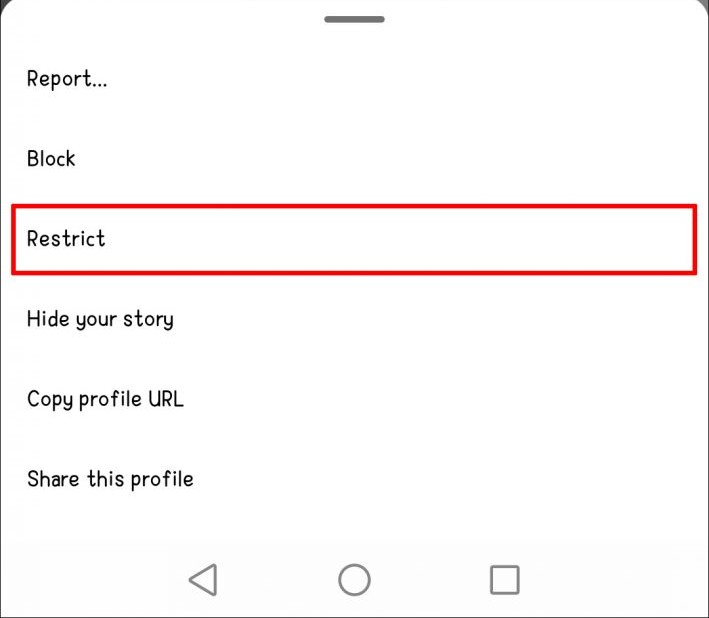
The account will now appear in your restricted accounts list.
2. Restrict Someone From a Comment
If someone leaves an unwanted comment on your post, you can restrict them directly from the comment.
- Open the post containing the comment.
- Find the comment from the person.
- Use the comment’s options menu.
- Select Restrict if available.
- Confirm your choice.
The exact gesture and menu options may vary between Android and iPhone.
3. Restrict Someone From Direct Messages
You can also restrict someone through your Instagram conversation.
- Open Instagram Direct Messages.
- Open the conversation with the person.
- Tap their name at the top.
- Open the available privacy or account options.
- Select Restrict and confirm.
The conversation will move to Message Requests.
How to See Restricted Accounts on Instagram
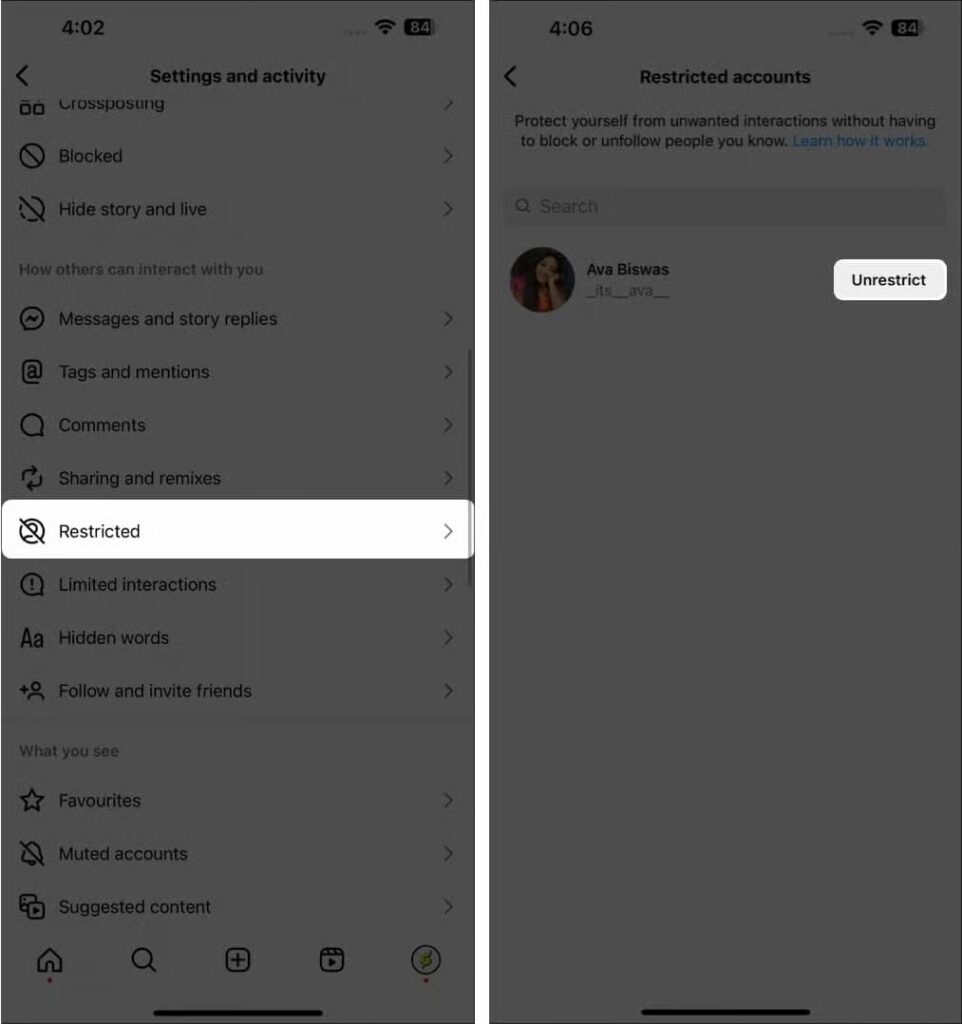
If you want to check whom you’ve restricted, Instagram provides a dedicated list.
- Open your Instagram profile.
- Tap the three-line menu.
- Open Settings and activity.
- Find Restricted under the section for managing interactions.
- View the accounts on your restricted list.
The exact location of this setting may change with Instagram app updates.
How to Unrestrict Someone on Instagram
If you no longer want to limit someone’s interactions, you can remove the restriction.
- Open Instagram.
- Go to your profile.
- Tap the three-line menu.
- Open Settings and activity.
- Select Restricted.
- Find the account you want to unrestrict.
- Tap Unrestrict next to their username.
You can also visit the person’s profile, open the three-dot menu, and select Unrestrict if available.
After unrestricting, their future comments and messages will be handled according to your normal Instagram settings.
Instagram Restrict vs. Block vs. Mute
Instagram offers several ways to manage unwanted interactions. However, Restrict, Block, and Mute serve different purposes.
| Feature | Restrict | Block | Mute |
|---|---|---|---|
| Person receives a notification | No | No | No |
| Can view your public posts | Yes | No, from the blocked account | Yes |
| Can comment normally | Comments are hidden from others | Cannot interact normally | Yes |
| Messages | Move to Message Requests | Messaging is blocked | Remain available |
| Can see your activity status | No | No normal access to your profile | Depends on your activity settings |
| Hides their posts from your feed | No | Yes | Yes, if you mute posts |
| Main purpose | Limit interactions quietly | Stop contact | Hide their content from your feed |
Choose Restrict when you want to limit someone’s interactions without blocking them.
Choose Block when you want a stronger boundary and do not want that account to interact with you.
Choose Mute when you simply don’t want to see someone’s posts or Stories but don’t want to change how they interact with your account.
Will Someone Know If I Restrict Them on Instagram?
Instagram does not send a notification when you restrict an account. However, the person may notice indirect signs, such as their comments not receiving visible responses or their messages not showing a Seen status.
Can a Restricted Person See My Stories?
Yes. Restricting someone does not automatically hide your Stories from them. If you want to prevent someone from viewing your Stories, use Instagram’s separate Hide story and live privacy setting.
Can I Read Messages From Someone I’ve Restricted?
Yes. Their messages appear in Message Requests, where you can read them without showing the usual read receipt.
Can a Restricted Person Still Tag or Mention Me?
Restrict is not a complete block on tagging and mentions. Use Instagram’s separate Tags and mentions settings if you want to control who can tag or mention your account.
Does Instagram Tell Someone When I Unrestrict Them?
Instagram does not send a notification when you remove a restriction. The person’s future interactions will follow your normal account settings.
Is Restrict Better Than Block on Instagram?
It depends on your goal. Restrict is useful for quietly limiting comments and messages, while Block is better when you want to stop an account from accessing and interacting with your profile.
Instagram’s Restrict feature is a useful way to manage unwanted interactions without completely blocking someone. It hides their new comments from other people, moves their messages to Message Requests, and prevents them from seeing your online status or read receipts.
The restricted person is not directly notified, and they can generally continue viewing your posts and Stories according to your privacy settings.