For many Windows 11 users, routine computing recently came to an abrupt halt. Core system apps such as Paint, Notepad, and the Snipping Tool suddenly refused to open, displaying cryptic error messages that made even basic tasks impossible to complete.
According to reports confirmed by Windows Latest, Microsoft moved quickly after acknowledging that a widespread issue was affecting multiple built-in Windows applications. The problem left thousands of users with partially unusable systems, sparking confusion and frustration as the affected tools are normally considered among the most reliable parts of the operating system.
What Caused Error 0x803F8001?
As complaints mounted across social media and Microsoft support forums, a common thread emerged: error code 0x803F8001. While the message appeared to suggest a local software failure, Microsoft later clarified that the root cause was not a faulty Windows update or user configuration.
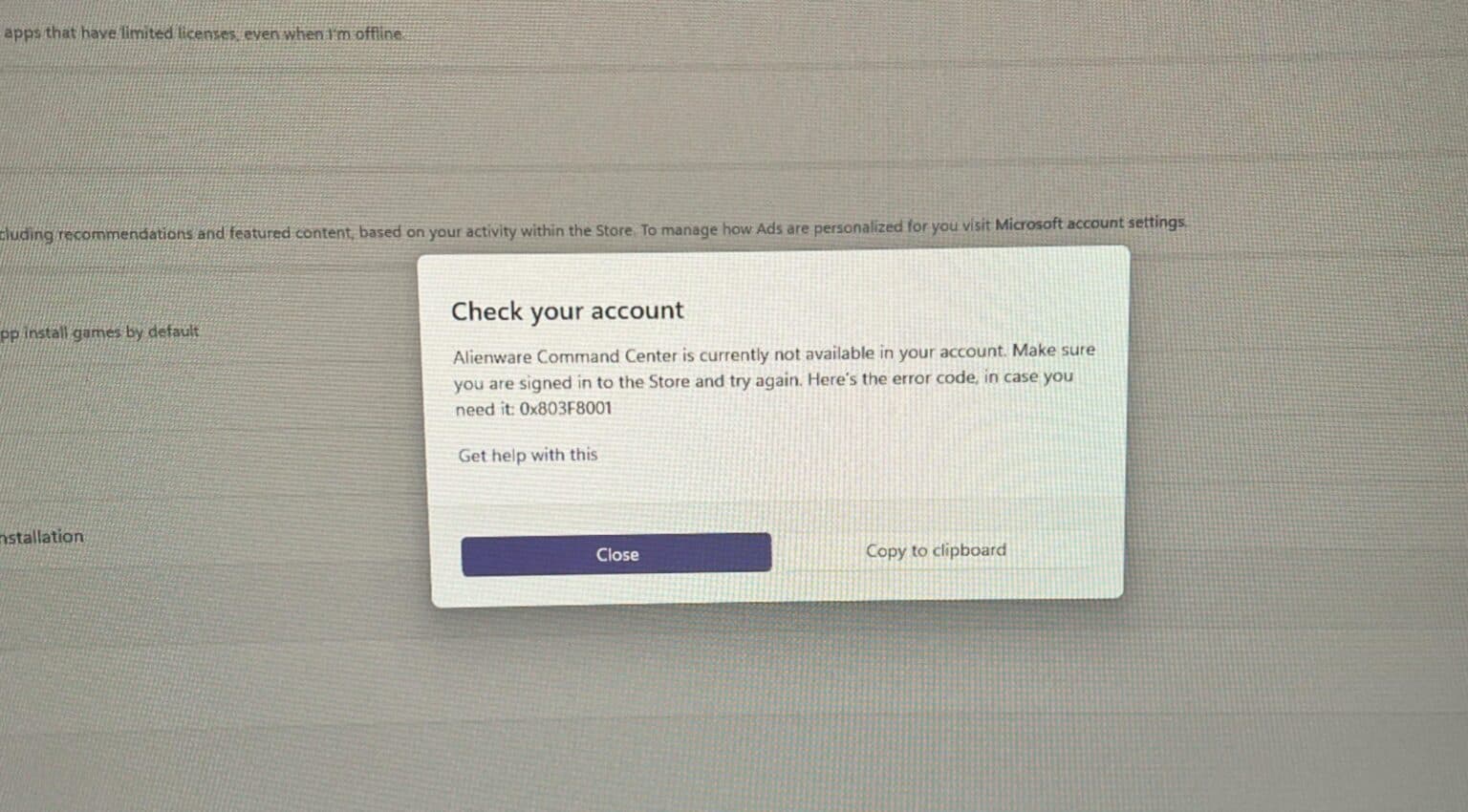
Instead, the issue stemmed from a server-side failure in the Microsoft Store licensing system. The outage prevented Windows from verifying licenses for apps that depend on Store infrastructure—even those that come pre-installed with the operating system. As a result, Windows Security, Notepad, Paint, and other inbox apps were blocked from launching despite being legitimately installed.
Because the verification process failed remotely, affected users had no clear indication of what went wrong or how to fix it on their own.
Who Was Affected the Most?
The disruption was particularly severe for users who rely on manufacturer-specific utilities built on Microsoft Store components. Owners of Dell and Alienware systems, for example, reported that the Alienware Command Center entered repeated crash loops, failing every time it attempted to start.
Interestingly, third-party applications that do not rely on Microsoft Store services—such as Google Chrome—continued to function normally. This contrast further highlighted how deeply integrated Store-based licensing has become within Windows 11’s core experience.
For many users, constant error pop-ups and missing system tools made their PCs feel unreliable, even though the underlying hardware and local software were intact.
Microsoft Confirms Fix Is Live
Microsoft has since confirmed that the issue has been fully resolved. Because the bug originated on the company’s servers, no manual updates or reinstalls are required. Once systems reconnect to Microsoft’s services, app licensing checks resume normally and affected applications open as expected.
In a brief statement, Microsoft said the incident is now closed.
A Rough Start to 2026 for Windows 11
This licensing outage adds to a growing list of Windows 11 issues reported in January, including bugs affecting Outlook Classic and File Explorer customization following recent mandatory patches. While this latest problem has been fixed quickly, it has once again raised concerns among users about the reliability of cloud-dependent system components.
For now, Windows 11 users can breathe a little easier—essential apps like Notepad and Paint are working again, and the licensing system is back online. Whether upcoming updates will restore broader confidence in the platform remains to be seen.