Microsoft is taking steps towards expanding the role of ReFS, its modern file system, beyond enterprise storage and development environments. After more than three decades of relying on NTFS for Windows installations, the company is now testing whether its operating system can be installed and booted from a ReFS-formatted partition.
The change is already taking shape in preview versions of Windows Server, while experimental builds of Windows 11 have also shown signs of similar support. However, the feature remains unfinished, and Microsoft has not announced any plans to replace NTFS across consumer versions of Windows.
The development marks a notable shift in how Microsoft approaches storage technology, although several technical and compatibility challenges remain before ReFS could become a practical option for everyday PC users.
Microsoft Expands ReFS Support in Windows
ReFS, short for Resilient File System, was introduced with Windows Server in 2012. Microsoft developed it to improve data integrity, reduce the risk of file system corruption and handle demanding storage workloads more efficiently.
Unlike NTFS, which has been the standard file system for Windows installations since the Windows NT era, ReFS was primarily designed for enterprise storage, virtualisation and large-scale data management.
Windows 11 already supports ReFS in certain scenarios through Dev Drive, a feature intended to provide developers with a dedicated environment for source code, project files and other development workloads. Until recently, however, installing and booting Windows directly from a ReFS partition remained a major limitation.
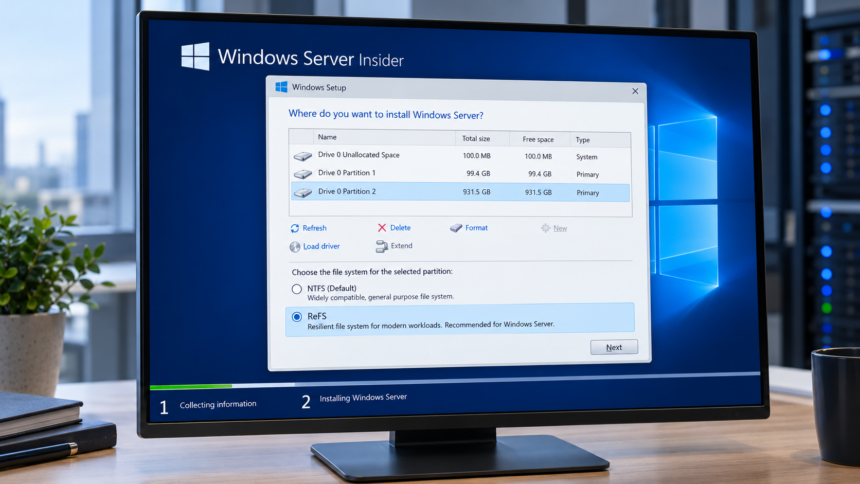
That restriction is now beginning to change. In February 2026, Microsoft confirmed that Windows Server Insider builds starting with build 29531 support installation and startup from ReFS-formatted storage.
Windows 11 has also shown progress in this area. According to Windows Latest, an experimental option appeared in Canary Channel build 27823, allowing users to choose between NTFS and ReFS during installation. However, the publication’s testing did not produce a successful Windows 11 installation on ReFS.
For now, the feature appears to be under development rather than ready for general use. Microsoft has not confirmed when, or whether, ReFS-based installations will become officially available to Windows 11 users.
How ReFS Differs From NTFS
NTFS remains widely used because of its compatibility, established management tools and support for a broad range of Windows applications. ReFS takes a different approach, prioritising data protection, storage efficiency and scalability.
Three features distinguish ReFS from the older file system.
Improved Protection Against Data Corruption
ReFS can use checksums to detect corruption in file system metadata and, when configured, file contents. On supported storage systems with redundant copies of data, it can also repair certain forms of corruption automatically without taking the volume offline.
These capabilities can be particularly useful in servers and systems that handle large amounts of important information.
However, ReFS cannot eliminate every form of data loss. If a storage device fails and no recoverable copy exists, the file system alone cannot restore the missing information. Regular backups remain essential.
Faster Copying Through Block Cloning
ReFS supports block cloning, a technology that can make certain file-copying operations more efficient by reusing existing data blocks rather than writing an entirely new copy.
This can benefit workloads involving large virtual machine files, disk images and development environments. When the operation and storage configuration are compatible, copying data within the same ReFS volume can require considerably less time and storage activity.
The feature does not make every file transfer instantaneous, however. Its benefits depend on the operation being performed and the underlying storage configuration.
Support for Extremely Large Volumes
ReFS is designed to accommodate volumes and files as large as 35 petabytes, according to Microsoft’s documented limits. NTFS has a documented maximum volume size of 256TB under the relevant configuration.
The difference matters most in data centres, enterprise storage systems and environments dealing with very large datasets. For typical home computers, these limits are unlikely to be a deciding factor.
ReFS Still Faces Compatibility and Management Challenges
Despite its advantages, ReFS is not a straightforward replacement for NTFS. The two file systems differ in their feature sets, and some traditional Windows storage functions are unavailable in ReFS. For example, ReFS does not support shrinking volumes in the same way NTFS does.
Microsoft also maintains separate requirements for recovery environments. Windows Server installations using ReFS still require an NTFS partition for the Windows Recovery Environment, highlighting that the transition involves more than simply changing the format of the system drive.
Compatibility with existing backup software, antivirus products and disk management utilities is another consideration. Applications and tools designed around NTFS may not support every ReFS configuration, potentially complicating deployment and maintenance.
Microsoft has also signalled restrictions on the use of ReFS with removable storage. According to reporting by Windows Latest on October 20, 2026, Windows is warning users about ReFS-formatted USB drives, with the company planning to block such drives by default beginning in January 2027.
The reported restriction concerns removable media and does not, by itself, rule out ReFS support for internal storage or future Windows installations. Instead, it indicates that Microsoft continues to distinguish between the environments in which it considers ReFS suitable.
Will ReFS Make Windows 11 Faster?
Whether ReFS will deliver a noticeable performance improvement on everyday Windows PCs remains an open question.
Its block-cloning capabilities can accelerate particular file operations, while its data-integrity features may benefit workloads that place a premium on storage reliability. Developers and users running virtual machines could see more practical advantages than those using a computer primarily for browsing, office work or gaming.
However, there is currently no conclusive evidence that installing Windows 11 on ReFS will automatically reduce boot times, lower memory usage or improve gaming performance. Those outcomes would need to be established through reliable benchmarks and broader testing.
Microsoft would also need to address compatibility, installation reliability, recovery procedures and support for third-party applications before recommending ReFS as a mainstream system drive format.
For the moment, NTFS remains the sensible choice for most Windows 11 users. It offers mature support and broad compatibility, while ReFS continues to develop for more specialised storage requirements.
NTFS Is Not Being Replaced Yet
Microsoft’s work on booting Windows from ReFS suggests that the company is exploring options beyond the file system that has underpinned Windows installations for decades. The progress in Windows Server and the experimental work in Windows 11 show that the technical boundaries are gradually changing.
Nevertheless, testing a new installation method is not the same as preparing to replace NTFS. Microsoft has yet to announce a consumer release date or confirm that ReFS will become the default file system for future Windows versions.
For now, ReFS remains a developing option with clear benefits in specific workloads but important limitations for general use. Its eventual role in Windows will depend on how successfully Microsoft resolves those issues and demonstrates meaningful advantages for users beyond enterprise storage.