If you’ve subscribed to Snapchat+, you’ve probably noticed planets appearing on some of your friends’ profiles. These aren’t just decorative icons. They’re part of the Friend Solar System, a Snapchat+ feature that shows how close you are to your friends based on how often you interact.
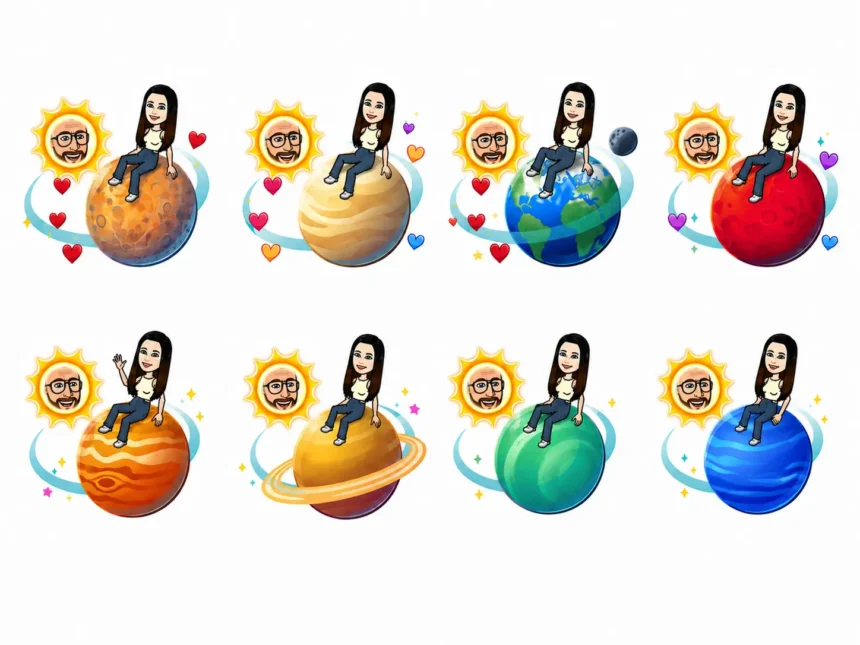
Each friend is assigned a planet, with Mercury representing your closest friend and Neptune representing your eighth closest friend. If you’ve been wondering what each Snapchat planet means or how to check your position in someone’s Friend Solar System, here’s everything you need to know.
What Are Snapchat Planets?
Snapchat Planets are part of the Friend Solar System, an exclusive feature available to Snapchat+ subscribers.
The feature treats you as the Sun, while your eight closest friends are assigned planets based on how frequently you exchange Snaps, Chats, and interact with one another.
The closer the planet is to the Sun, the stronger your friendship ranking.
For example, if you’re assigned Mercury on a friend’s profile, you’re their number one best friend. If you’re Neptune, you’re still among their top eight friends, but you rank eighth.
Keep in mind that only Snapchat+ subscribers can access the Friend Solar System feature.
Snapchat Planets in Order
The Friend Solar System follows the same order as our real solar system.
| Planet | Friendship Rank |
|---|---|
| Mercury | #1 Best Friend |
| Venus | #2 Best Friend |
| Earth | #3 Best Friend |
| Mars | #4 Best Friend |
| Jupiter | #5 Best Friend |
| Saturn | #6 Best Friend |
| Uranus | #7 Best Friend |
| Neptune | #8 Best Friend |
Each planet also has its own unique design and visual effects, making it easy to identify your friendship ranking at a glance.
Snapchat Planet Meanings
Here’s what each planet represents in the Friend Solar System.
Mercury
Mercury means you’re someone’s closest friend on Snapchat. You interact with each other more than anyone else through Snaps and Chats.
Venus
Venus indicates you’re their second closest friend. You communicate regularly but slightly less than your top-ranked friend.
Earth
Earth represents the third position. You’re still one of their closest contacts and interact frequently.
Mars
Mars means you’re their fourth closest friend. You stay in touch often but aren’t among the top three.
Jupiter
Jupiter is assigned to the fifth closest friend. While your interactions remain consistent, other friends rank higher.
Saturn
Saturn represents the sixth position in the Friend Solar System.
Uranus
Uranus indicates you’re the seventh closest friend on Snapchat.
Neptune
Neptune is the eighth and final planet in the Friend Solar System, meaning you’re still part of their top friends but rank last among the visible planets.
How to See Snapchat Planets
To view Snapchat Planets, you’ll need an active Snapchat+ subscription.
Once subscribed:
- Open Snapchat.
- Tap your friend’s Bitmoji to open their profile.
- Look for the Best Friends or Friends badge.
- Tap the badge to view your position in their Friend Solar System.
If no planet appears, either the feature has been disabled or one of you isn’t eligible to view the Friend Solar System.
Difference Between Best Friends and Friends Badges
Snapchat uses two different friendship badges.
- Best Friends means you’re in each other’s top eight friends.
- Friends means you’re one of their top eight friends, but they aren’t in yours.
This distinction helps explain why you may see different friendship statuses with different users.
How Does Snapchat Decide Planet Rankings?
Snapchat doesn’t reveal its exact algorithm, but rankings are based on your interactions with another user.
These interactions include:
- Sending and receiving Snaps
- Chat conversations
- Maintaining Snapstreaks
- Overall engagement over time
The more frequently you communicate with someone, the closer your assigned planet is likely to be.
How to Get Snapchat Planets
Snapchat Planets are only available with a Snapchat+ subscription.
After subscribing:
- Open Snapchat.
- Tap your profile icon.
- Subscribe to Snapchat+ if you haven’t already.
- Enable the Friend Solar System feature from Snapchat+ settings if it’s turned off.
Once enabled, eligible friendship badges will begin displaying planets automatically.
Why Can’t I See Snapchat Planets?
There are several reasons why Snapchat Planets may not appear.
- You don’t have Snapchat+.
- Your friend doesn’t have Snapchat+.
- The Friend Solar System feature is disabled.
- You’re not among each other’s top eight friends.
- The app needs to be updated to the latest version.
Updating Snapchat and checking your Snapchat+ settings usually resolves most issues.
Frequently Asked Questions
Are Snapchat Planets available to everyone?
No. The Friend Solar System is an exclusive Snapchat+ feature and requires a paid subscription.
What does Mercury mean on Snapchat?
Mercury means you’re someone’s number one best friend on Snapchat and interact with them more than anyone else.
Can my Snapchat Planet change?
Yes. Your planet changes automatically based on your recent interactions. If you communicate with someone more or less over time, your friendship ranking may increase or decrease.
Can I see everyone’s Snapchat Planet?
No. You can only view your own position in another user’s Friend Solar System if both accounts meet Snapchat’s eligibility requirements and the feature is enabled.
Snapchat Planets add a fun visual twist to the app’s Best Friends system by turning your closest friendships into a miniature solar system. While the feature doesn’t affect how Snapchat works, it gives Snapchat+ subscribers an easy way to see where they rank among their friends.