If you own a PlayStation 5, you’ve probably hit the same wall I have more than once: running out of storage. I try to look on the bright side-limited space forces me to actually finish the games I’ve already started instead of juggling half a dozen at once. Still, there are moments when I stare at the storage screen and realize there’s nothing I’m willing to delete.
If that sounds familiar, there’s a simple but incredibly useful tip you should know-one that I can’t believe took me years to notice.
I’ve had my PS5 since launch, which means about five years of regular use. In that time, I’ve unlocked hundreds, maybe even thousands, of trophies. And every single time a trophy pops, the console quietly saves a short gameplay clip in the background.
Now be honest-how often do you actually go back and watch those trophy clips? Personally, I never do. I enjoy earning trophies, but I have zero interest in rewatching the moment I earned them. Yet all those clips just sit there, slowly consuming internal storage.
If you’re in the same boat, the first thing you should do is go through and delete those old trophy videos. You might be surprised by how much space they’re taking up.
After that, there’s one setting you’ll want to change so the problem doesn’t come back.
Turn off automatic trophy recordings on PS5
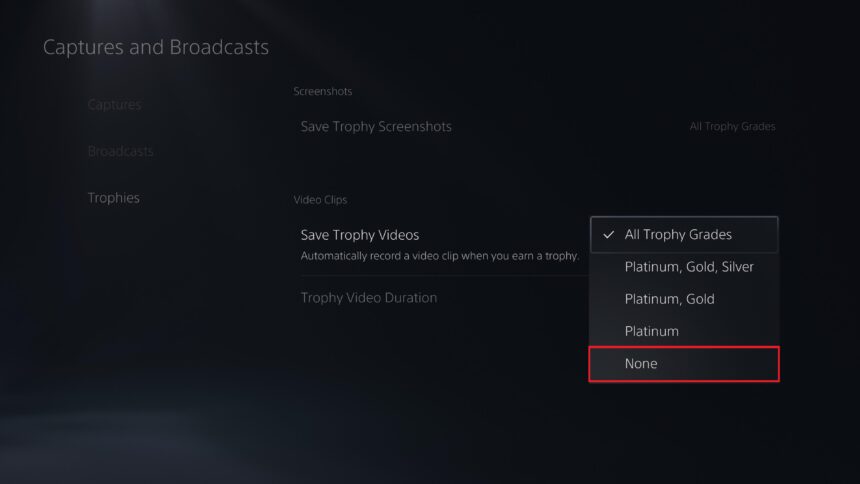
To stop your PS5 from recording a clip every time you earn a trophy:
- Open Settings
- Go to Captures and Broadcasts
- Select Trophies
- Toggle off Automatic Recording
Once this is disabled, your console will no longer save a video for every trophy you unlock. That alone can prevent your storage from filling up far faster than you’d expect.
Fine-tune trophy recordings instead of disabling them completely
If you still like the idea of keeping some trophy clips, you don’t have to turn the feature off entirely. The PS5 gives you several ways to customize it:
- Adjust clip length – You can reduce recordings from 30 seconds to something shorter, like 10 seconds
- Choose which trophies are recorded – For example, you can keep recordings for platinum trophies only and skip bronze, silver, and gold
- Lower capture resolution – Smaller resolution clips take up significantly less space
These tweaks let you keep the moments that actually matter to you without letting storage quietly disappear in the background.
It’s a small change, but it can make a real difference-sometimes just enough to squeeze in one more game download without having to sacrifice something you’re still playing.