The Windows 11 ecosystem keeps moving forward, and this time, Microsoft is turning its attention to two long-standing classics: Paint and Notepad. The company has begun rolling out notable updates for Windows Insiders, especially those in the Canary and Dev channels, introducing new features designed to make these once-basic apps far more capable and modern.
According to an official post on the Windows Insider blog, these updates go beyond simple visual refreshes. Microsoft’s goal is to enhance creativity and productivity by integrating smarter tools, including AI-powered features, while also improving support for modern text formats.
With the latest versions of Paint (11.2512.10.0) and Notepad (11.2512.191.0), Microsoft is reinforcing its push to weave intelligent functionality and Copilot more deeply into everyday workflows, transforming familiar utilities into more versatile and efficient tools for today’s users.
Notepad Evolves Into a Smarter Writing Tool
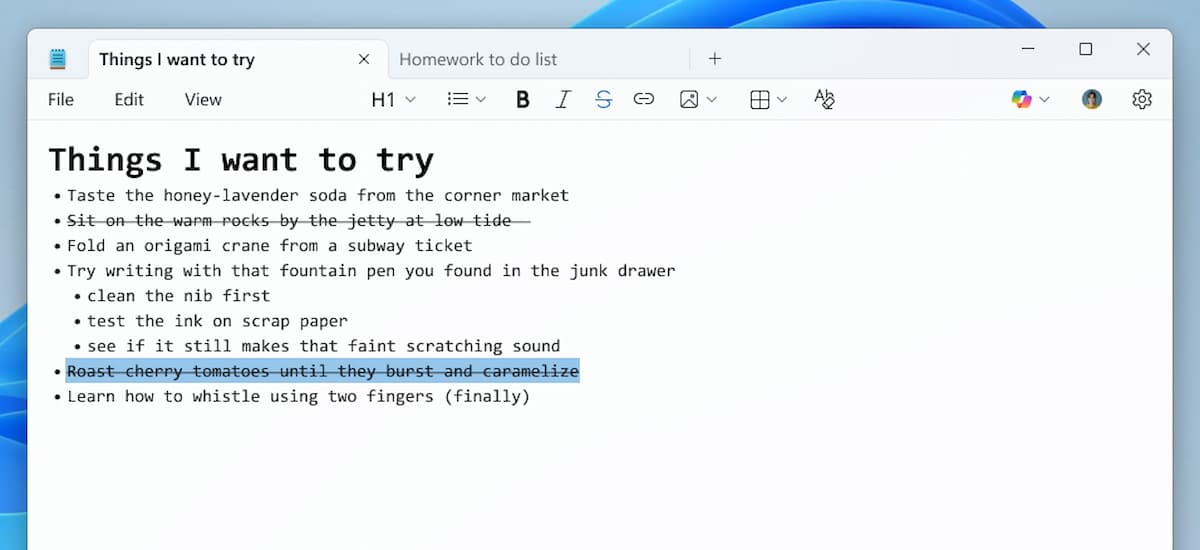
Notepad has evolved well beyond its old role as a basic text editor and is now shaping up to be a lightweight yet capable tool for writers. The latest updates introduce several meaningful improvements:
- Broader Markdown support: Notepad now includes additional formatting options, such as nested lists and strikethrough text. These can be applied by typing Markdown syntax manually, using keyboard shortcuts, or selecting options from the toolbar.
- Real-time AI output through “Streaming”: AI-powered features like Write, Rewrite, and Summarize no longer deliver results all at once. Instead, text appears progressively as it’s generated, letting users follow along and interact more naturally with the process.
- Improved onboarding experience: A new welcome dialog has been added to help both first-time and long-time users quickly discover and understand the app’s newest and most useful features.
Together, these changes transform Notepad into a more modern, efficient writing companion while preserving its familiar simplicity.
Paint Gains Generative Creativity and Precision Tools
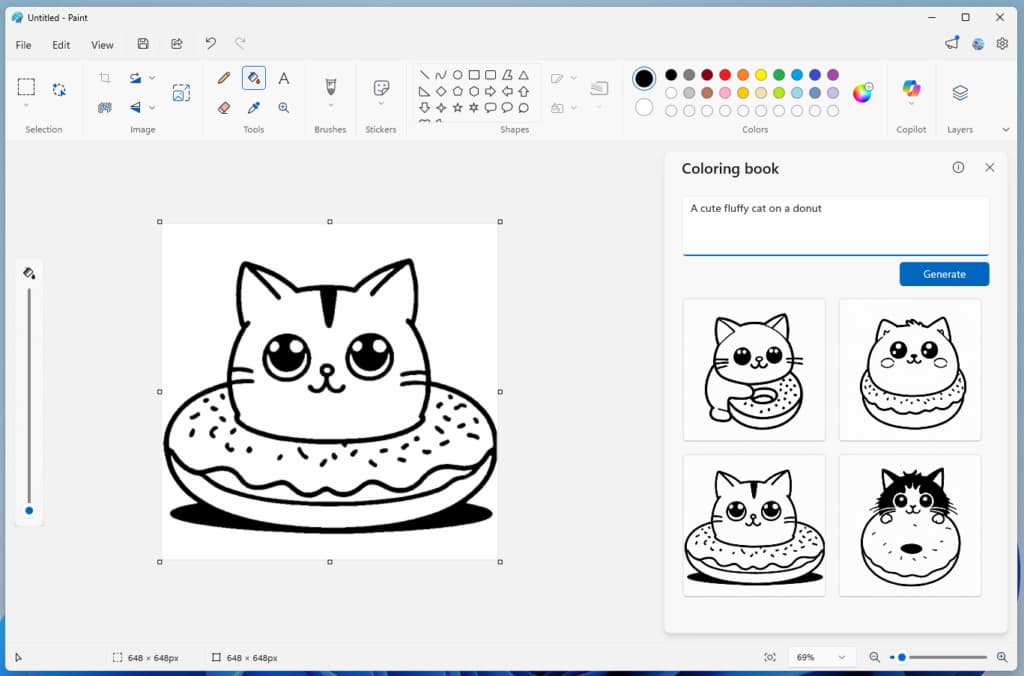
Paint is receiving one of its most compelling upgrades to date, with a clear focus on newer devices equipped with dedicated AI hardware. The update introduces features that push the app far beyond its traditional role.
- Colouring Book: This new AI-driven tool allows users to generate ready-to-colour illustrations simply by typing a description. A prompt such as “a fluffy cat on a donut” produces clean, artistic outlines that can be filled in however you like. This feature is exclusive to Copilot+ PCs and requires signing in with a Microsoft account.
- Fill tool tolerance slider: The classic paint bucket now comes with an adjustable tolerance control. This lets you fine-tune how strictly the tool detects color boundaries—either keeping fills tightly contained or allowing them to spread across similar shades when needed.
Together, these changes highlight Microsoft’s ongoing effort to elevate its built-in apps. Notepad is emerging as a fast, practical Markdown editor enhanced by real-time AI assistance, while Paint is stepping into creative territory with AI-powered image generation backed by specialized hardware like NPUs.
For now, these features are rolling out gradually to Windows Insiders, who will help test and refine them before they eventually arrive in the stable release of Windows 11 for everyone.