
Microsoft is rolling out a major update to the Xbox app for Windows, bringing a redesigned interface, faster performance, and improvements to its gaming and social features. Announced on November 5, the update is currently rolling out to members of the Xbox Insider Program as the company works toward a broader release.
The overhaul aims to address some of the long-standing complaints about the PC Xbox app, particularly its slow loading times and cumbersome navigation. Microsoft says the new version is considerably faster and makes it easier to browse games, manage a library, and connect with friends.
The Xbox app launches up to 60% faster
Performance is one of the biggest priorities in Microsoft’s redesign. According to the company’s internal testing, the updated Xbox app delivers substantial improvements over the previous version:
- Startup times are up to 60% faster, allowing the application to open more quickly.
- Page loading is up to 50% faster, including the Home, Store, and Game Pass sections.
- Internal window opening is up to 65% faster, making navigation between different areas more responsive.
These figures come from Microsoft’s own tests and have not been independently verified. Actual results may vary depending on the computer, system configuration, and network connection.
Nevertheless, the improvements could make a noticeable difference for PC players who regularly use the Xbox app to access their games and subscriptions. Its performance has often felt sluggish compared with what users expect from a modern gaming platform, particularly when switching between the store, Game Pass, and personal library.
A more organised library and improved social features
The redesign also changes how players interact with their game collections. The library now features simplified navigation, additional filters, and more organization options, making it easier to find installed titles and browse owned games.
Microsoft has also given social features a more prominent position in the interface. Friends are now integrated into the main navigation, helping players see what their contacts are playing, start conversations, and join groups with fewer steps.
Search has received an overhaul as well. Players can use a unified search experience to find games, additional content, and other users without navigating separate sections.
The update also includes refreshed game artwork, settings, and interface animations. Together, these changes are intended to make the application feel more consistent and reduce the number of actions needed to complete common tasks.
Xbox Cloud Gaming gets a redesigned library
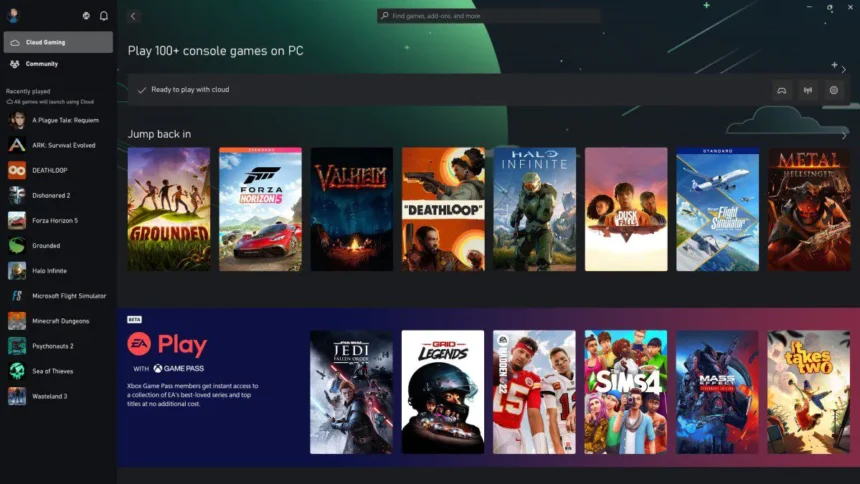
Microsoft is extending some of the improvements beyond the Windows application. The web version of Xbox Cloud Gaming is receiving a library that combines compatible Game Pass titles with purchased games that support cloud streaming.
The cloud gaming interface also makes better use of available screen space, particularly on larger displays. Users can choose between light, dark, and high-contrast appearance options.
Microsoft is gradually bringing elements of this updated design to cloud gaming applications on supported televisions and virtual reality devices, aiming to provide a more consistent experience across its gaming ecosystem.
How to try the redesigned Xbox app
The updated Windows application is currently being tested through the Xbox Insider Program. Players interested in trying it can install Xbox Insider Hub from the Microsoft Store and check which PC preview updates are available.
Joining the program does not necessarily guarantee immediate access to the redesigned app, as Microsoft releases features and updates to participants gradually.
The company has not yet provided a definitive date for the general release.
A much-needed improvement for Xbox on PC
The Xbox app is an important part of Microsoft’s PC gaming strategy, connecting Windows users with Game Pass, purchased games, cloud streaming, and social features. However, a slow and inconsistent interface has made the experience less appealing than it should be.
If Microsoft’s performance claims hold up in everyday use, this redesign could make the application considerably more pleasant to use. Faster startup, quicker navigation, and a better-organised library are practical improvements that address some of the platform’s most noticeable shortcomings.
For now, the biggest question is how quickly Microsoft can deliver the update to everyone. The Insider rollout is a first step, but PC players will be waiting to see when the improved Xbox experience becomes generally available.