
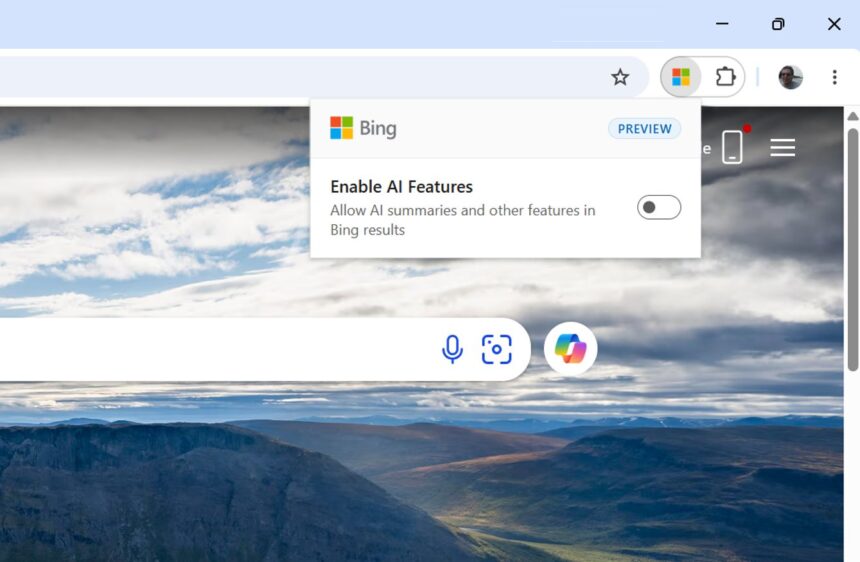
Microsoft has introduced a new browser extension for Google Chrome and Microsoft Edge that lets users disable AI-generated overviews and chat features in Bing search results.
The new extension gives users more control over their search experience, allowing them to switch between AI-powered results and traditional search whenever they want.
“When it comes to AI, we believe Bing users should have a choice in how they search,” Microsoft explained in a new blog post. The company says Bing supports both AI-powered and traditional search experiences, and the extension makes it easier to enable or disable AI features.
How the New Bing Extension Works
The extension adds a simple toggle to your browser, allowing you to enable or disable Bing’s AI features at any time. Once disabled, AI overviews and chat features will no longer appear in Bing search results.
Microsoft says its research indicates that users want the freedom to decide whether AI is involved in each search session.
The extension is available for both major browsers:
- Google Chrome: Download the Microsoft Bing AI Search extension
- Microsoft Edge: Download the Microsoft Bing AI Search extension
There is one important detail to consider before installing it: the extension changes your browser’s default search provider to Bing. This makes sense because its controls are designed specifically for Bing search results, but users who prefer Google or another search engine may not appreciate the change.
It is also unclear why Microsoft chose to offer this functionality through a browser extension rather than adding a dedicated toggle directly to the Bing website.
Disable Bing AI Features Without Installing an Extension
Fortunately, installing the extension isn’t the only way to remove AI features from Bing search results.
Microsoft has also introduced an operator that lets users disable AI features for individual searches. Simply add -ai to the end of your search query.
For example:
best laptops for gaming -ai
Adding this operator tells Bing to disable its AI features for that particular search.
The main drawback is that you must remember to include -ai every time you search. The browser extension is more convenient because it automatically applies your preference without requiring you to modify each query.
Microsoft Gives Bing Users More Control Over AI Search
Microsoft’s new extension is a useful option for people who prefer traditional search results without AI-generated overviews or chat responses.
Users can choose the browser extension for a persistent setting or use the -ai operator when they only want to disable AI for a specific search.
While a built-in toggle on the Bing website might have been a simpler solution, the new extension gives Chrome and Edge users another way to control how they search.