Microsoft has released the February 2026 cumulative update KB5077181 for Windows 11, and it’s far more than a routine security patch. This update raises the system build to 26200.7840 for version 25H2 (and 26100.7840 for 24H2) and introduces several notable changes, new features, and unusually large download sizes.
While monthly updates often install quickly in the background, this one falls into the heavier category – both in size and the number of changes it includes.
A Single Platform for 24H2 and 25H2
Microsoft continues to maintain Windows 11 versions 24H2 and 25H2 on the same underlying platform. That means most features and fixes arrive for both versions, although activation may happen gradually through staged rollouts.
The update appears in Windows Update as:
2026-02 Security Update (KB5077181)
Unless updates are paused, it installs automatically as part of the standard monthly cycle.
Offline Installers Available (.MSU)
For users and administrators who prefer manual installation, Microsoft has published standalone.MSU installers through the Microsoft Update Catalog.
This option is useful for:
- Systems without internet access
- PCs where Windows Update fails
- Enterprise environments with controlled deployments
- IT administrators managing multiple machines
Manual installation also gives more control over when and how the update is applied.
Why the Update Is So Large
One of the most talked-about aspects of KB5077181 is its size – over 4 GB in many cases.
Approximate Download Sizes
- 25H2 x64: 4170.5 MB
- 25H2 ARM64: 3853.1 MB
- 24H2 x64: 4170.5 MB
- 24H2 ARM64: 3825.1 MB
The reason appears to be Microsoft bundling local AI models (reportedly related to the Phi family) directly into the system.
However, Microsoft states that these models will only be used on devices with dedicated AI hardware, specifically systems with a 40+ TOPS NPU, such as Copilot+ PCs.
If your computer doesn’t include an NPU, the AI features should remain inactive – even though the files are still downloaded.
(TOPS stands for Trillions of Operations Per Second, a measure of AI inference performance.)
New Features and Improvements
1. Cross-Device Resume (Windows Handoff)
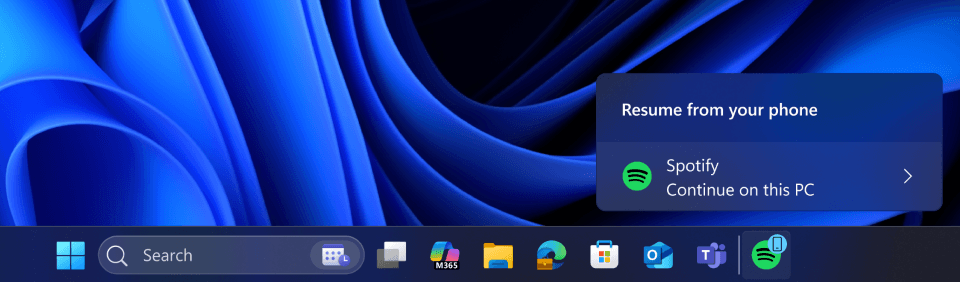
One of the most practical additions is the Cross-Device Resume. This feature allows you to start an activity on your phone and continue it on your PC.
With this update, support expands beyond OneDrive to include:
- Microsoft Office apps (Word, Excel, PowerPoint)
- Spotify sessions
- Web activity in supported mobile browsers
When available, Windows will suggest resuming the activity directly from the taskbar.
2. New Windows MIDI Services
For musicians and creators, Microsoft has introduced a modern Windows MIDI Services layer.
Key improvements include:
- Support for MIDI 1.0 and MIDI 2.0
- Compatibility between legacy and modern audio APIs
- Shared device access, allowing multiple apps to use the same MIDI hardware simultaneously
This update modernizes an area of Windows that had seen little change for years.
3. Smarter Smart App Control
Smart App Control (SAC) helps block potentially unsafe applications. Previously, enabling or disabling it often required reinstalling Windows.
With KB5077181:
- SAC settings can now be changed directly from Windows Security
- No clean installation should be required (availability may roll out gradually)
This change makes Windows security less restrictive and more user-friendly.
4. Ongoing Interface Updates
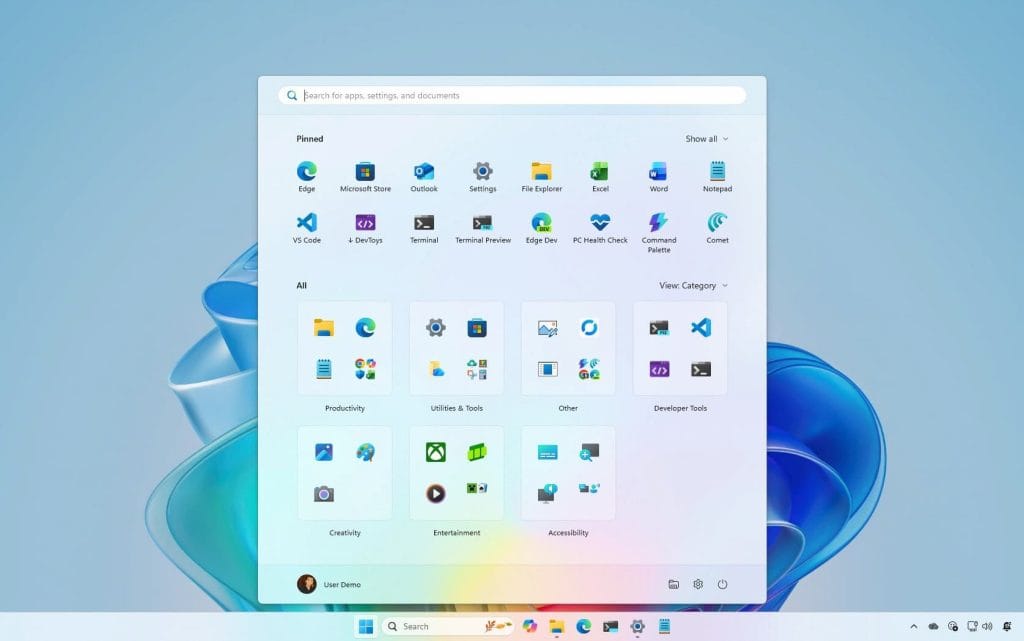
Microsoft is also expanding the rollout of visual improvements, including:
- The redesigned Start menu (larger layout, single-page access)
- New battery icons with clearer status indicators
As with many Windows features, these changes are being deployed gradually, so not all users will see them immediately.
More Than a Typical Monthly Patch
KB5077181 reflects Microsoft’s current strategy: combining security updates, system improvements, and new features into a single package. While this approach results in larger downloads, it also means users receive meaningful changes more frequently.
Between AI readiness, cross-device continuity, improved creative tools, and more flexible security controls, the update shows a clear focus on making Windows feel more modern, connected, and consistent across devices.
For users, the only downside may be the download size – but the scope of improvements makes this one of the more significant monthly updates in recent months.