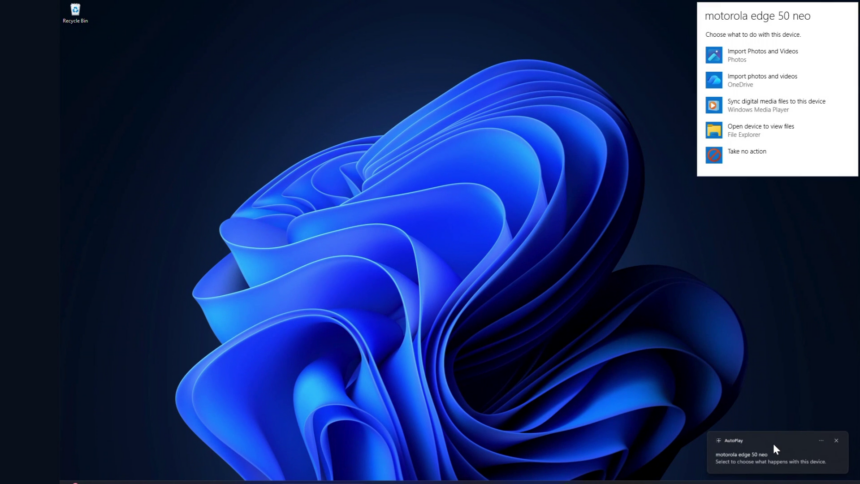
Microsoft is preparing a redesigned version of the AutoPlay dialog for Windows 11, replacing one of the operating system’s oldest interface elements with a modern WinUI 3 implementation.
The company confirmed the update in its July 31 Windows quality commitment, stating that the refreshed AutoPlay experience will soon arrive in Windows Insider Preview Experimental builds alongside additional File and Folder Properties dialogs.
AutoPlay is the pop-up window that appears when users connect a USB drive, SD card, or other removable media, allowing them to choose how Windows should handle the device.
The feature has remained largely unchanged since the Windows 7 era, retaining its classic Win32 interface with a white background and legacy controls.
The upcoming redesign will introduce native dark mode support, Fluent typography, rounded interface elements, and a visual style consistent with the rest of Windows 11.
Unlike legacy Win32 dialogs, WinUI 3 supports system-wide themes and modern interface scaling without requiring developers to build those features separately.
The AutoPlay update is part of Microsoft’s ongoing effort to replace older Windows interface components with WinUI 3 versions.
Over the past several months, the company has begun modernizing a number of long-standing system dialogs, including File Explorer Properties, Print Management, and the Run dialog. Widgets have also adopted the newer interface framework.
Microsoft said it is continuing to extend WinUI 3 across the Windows shell, which includes core interface elements such as the Start menu, taskbar, File Explorer, and system dialogs.
Performance Improvements Included
Beyond visual changes, Microsoft says the migration to WinUI 3 will also improve performance and efficiency.
The company has been working to reduce memory usage, lower latency, and improve resource management across Windows 11. According to Microsoft, WinUI 3 applications are designed to consume less memory while offering better responsiveness than older interface technologies.
The company has also introduced improvements to its memory allocation system and reduced overhead in components that rely on Chromium and WebView2.
Microsoft has acknowledged that Windows 11 can be resource-intensive, particularly on systems with 8GB of RAM, and has pledged to improve performance across lower-memory devices before the end of 2026.
The ongoing replacement of legacy Win32 components forms part of that broader optimization effort. By rebuilding more interface elements with WinUI 3, Microsoft aims to reduce inconsistencies across the operating system and make Windows 11 more efficient.
Although Microsoft has not announced a release date for the redesigned AutoPlay dialog, the feature is expected to appear first in Windows Insider Preview Experimental builds before expanding to future Windows 11 updates.