People who regularly watch YouTube on their TVs may soon notice that the app appears and functions a little differently. On Thursday (11), YouTube announced a visual refresh for its TV interface, designed to make navigation smoother and improve overall usability when watching content on larger screens.
According to a post shared by a member of the YouTube team in the platform’s Community section, the goal of the update is to deliver a more fluid and intuitive experience. The redesign focuses on easier navigation, clearer controls, and fewer distractions while watching videos. Interaction tools-such as liking, commenting, and subscribing-have also been made more visible and easier to access, allowing viewers to engage more naturally with their favourite creators.
The changes affect several parts of the interface, including how video titles are displayed and how playback and interaction controls are organised.
What’s changing on YouTube for TV users
One of the most noticeable updates is the new placement of video titles. Instead of being clickable, titles now appear in the top-left corner of the screen and serve only as informational text. This adjustment is meant to clearly separate the title from interactive elements, reducing accidental clicks and visual clutter.
To replace the clickable title, YouTube has added a dedicated “Description” button. Selecting this option opens a panel that displays important video details, including the full description, comments, and information about the creator, making it easier to explore content without interrupting playback.
Reorganised playback and interaction controls
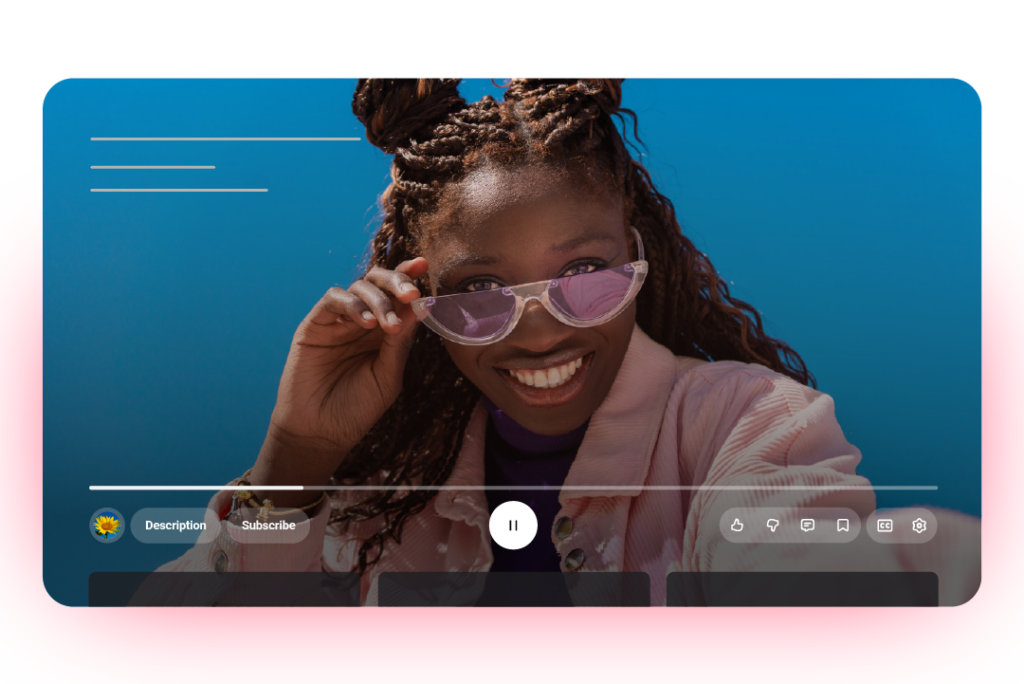
Another major part of the redesign is the new control layout, which groups buttons into three distinct sections below the video timeline:
- Left side: Channel name, Description, and Subscribe
- Center: Previous, Pause/Play, and Next
- Right side: Like, Dislike, Comment, Save, Captions, and Settings
This structure is intended to make controls more predictable and easier to find, especially when navigating with a remote rather than a touchscreen or mouse.
YouTube also confirmed that the Subscribe button will always remain visible, even on paid videos. The same applies to the “Get notified” option for upcoming live streams, ensuring viewers can easily follow creators and stay updated on future broadcasts.
New features for live content and subscribers
The update also introduces a new “Multiview” control, specifically designed for live sports content. This feature enables viewers to switch between multiple live feeds, making it easier to follow different games or camera angles simultaneously.
In addition, YouTube Music and YouTube Premium subscribers will gain access to a new “view mode”, offering enhanced viewing options tailored to their subscriptions.
- Common YouTube Live Stream Errors
- YouTube Channel Ideas for Beginners
- Reactivate a Hidden YouTube Channel
- How to Rename Your YouTube Channel