Are there some people you’d rather not share your WhatsApp status with?
It could be an ex, a distant relative, or just someone who checks in a little too often. Whatever the reason, you don’t have to let everyone see your updates. This simple guide will show you how to hide your WhatsApp status from selected contacts.
Take control of who sees your moments and enjoy a bit more privacy on one of the world’s most popular messaging apps. Let’s jump right in.
How to Hide WhatsApp Status from Specific Contacts
What Happens When Changing WhatsApp Status Privacy
Before proceeding, you must keep in mind what happens when you choose to make the switch:
- If you’ve already shared a Status, the new changes won’t affect it – you’ll need to republish it;
- If you choose to disable read receipts, you will not be able to know who has seen your post – the same will happen if another contact disables the function: you will also not know that they have seen your update.
How to change WhatsApp status privacy
- Open WhatsApp (Android | iOS) and go to the “Status” tab on the top menu or by dragging the screen to the left.
- Tap the “Three dots” icon located in the upper right corner of the screen (Android) or tap “Privacy” (iPhone);
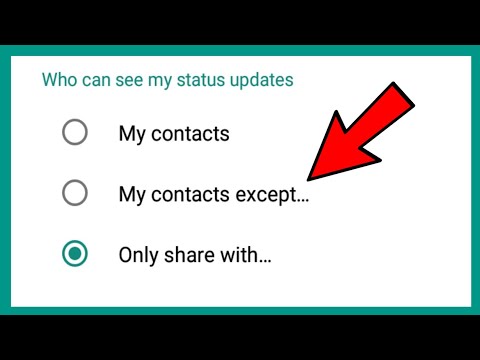
- Once this is done, select “My contacts except…” and choose who will not be able to see or “Share only with…” and choose only who you want to be able to see your post.
- If you want to change these settings or go back to the initial settings and allow everyone to see your Status, choose the option “My Contacts”;
- Once the adjustments are complete, tap “OK,” then create your publication as usual. So whoever you choose to hide will not be able to see your Status.
What if I shared the Status on Facebook or Instagram?
Since WhatsApp allows integration with other Meta platforms, such as Facebook and Instagram, the idea is the same if the publication has already been shared there.
The content needs to be republished, and on top of that, you need to adjust the privacy settings for each social network on which you want to hide it.
- Send Photos in PDF by WhatsApp
- How to Check if Someone Is Online on WhatsApp
- Enable two-step verification in WhatsApp