
Google Workspace users now have another AI assistant to choose from without leaving their documents, spreadsheets, or presentations. Anthropic has brought Claude directly into Google Docs, Sheets, and Slides, putting it alongside Google’s own Gemini assistant.
The new Claude for Google Workspace integration entered public beta on October 6 for users with eligible paid Claude plans. It allows users to draft documents, edit existing content, analyse spreadsheet data, and refine presentations from within Google’s productivity apps.
Gemini already offers AI features across eligible Google Workspace and Google AI plans. Its biggest advantage is the ability to draw information from other Google services, including Drive, Gmail, and Chat, depending on the user’s plan and available permissions.
Both assistants can help with everyday office work, but they approach it differently. Claude focuses on working directly with the file you have open, while Gemini benefits from its deeper integration with Google’s wider ecosystem.
So, which AI assistant should you use in Google Workspace? The answer depends on the task, the amount of context you need, and how much control you want over AI-generated changes.
Claude vs Gemini in Google Workspace
Anthropic’s new integration opens Claude in a sidebar inside Google Docs, Sheets, and Slides. It can inspect the active file, work with selected text or cells, and make changes without requiring you to switch to another application.
Anthropic also offers separate Google Workspace connectors through Claude, allowing users to create and edit Google files from Claude’s own interface.
| Feature | Claude | Google Gemini | Advantage |
|---|---|---|---|
| Google Docs | Drafts, rewrites, restructures, and edits documents | Creates and edits content using broader Workspace context | Gemini for cross-app research |
| Google Sheets | Builds models, repairs formulas, creates charts and pivot tables, and supports Python-based transformations | Generates formulas, charts, pivot tables, formatting, and other spreadsheet actions | Depends on the task |
| Google Slides | Creates slides, rewrites content, and restyles presentations | Generates editable presentations from prompts and reference files | Gemini for presentation creation |
| Context | Open file and enabled connectors | Can use information from other Google apps | Gemini |
| Edit approvals | Offers approval controls, including asking before edits | Provides generated actions and suggestions users can review | Claude for explicit edit control |
| Availability | Public beta for eligible paid Claude plans | Available through eligible Workspace and Google AI plans | Depends on your subscription |
Claude’s Workspace integration also has limitations. According to Anthropic’s documentation, it cannot read or resolve Google Docs comments, access Connected Sheets tabs backed by BigQuery, or refresh linked charts in Slides. The Claude sidebar must remain open while it completes a task.
These restrictions matter if you intend to use either assistant for complex, multi-step work.
How We Compared Claude and Gemini
This comparison focuses on their documented capabilities inside Google Docs, Sheets, and Slides rather than comparing their underlying AI models in isolation.
We considered how each assistant edits files, accesses information from other services, handles spreadsheet calculations, creates presentations, and gives users control over changes.
The comparison also considers practical workflow differences. An assistant who produces excellent writing may not be the best choice for a spreadsheet-heavy role, while a tool that creates presentations quickly may be less useful if it cannot access the information needed to build them.
Claude vs Gemini in Google Docs
Google Docs is where the difference between focused editing and cross-app research becomes particularly clear.
What Claude Can Do in Google Docs
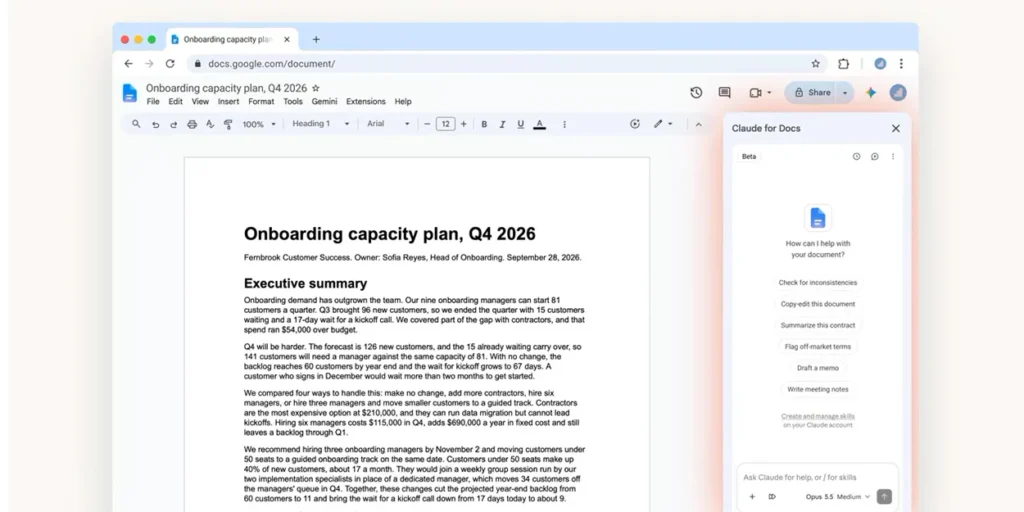
Claude can draft new content, rewrite paragraphs, reorganize long documents, shorten text, and turn notes into structured tables. It can also work with content across document tabs.
Its editing controls are worth noting. In the default “Ask before edits” mode, Claude requests approval before making changes. Users can also choose “Accept all edits” for ordinary content changes without repeated approval. Certain sensitive actions, including adding links or external images, still require confirmation.
This setup makes Claude appealing to users who want help improving an existing document while retaining control over what changes.
What Gemini Can Do in Google Docs
Gemini’s main advantage is its connection to the rest of Google Workspace.
Depending on the available features and permissions, Gemini can use information from Google Drive, Gmail, Chat, and the web to help create or revise a document. It can reference specific files and use an existing document’s writing style, structure, or layout as a guide.
Users can also choose which sources Gemini should consider for a task.
Our verdict for Google Docs: Gemini is the better starting point when a document depends on information scattered across several Google services. Claude is a strong alternative for rewriting, restructuring, and making controlled edits to the document already in front of you.
Claude vs Gemini in Google Sheets
Spreadsheets are a more balanced contest because both assistants offer useful tools for working with data.
Claude’s Spreadsheet Capabilities
Claude can build spreadsheet models, write and troubleshoot formulas, clean data, normalize values, create charts, and explain how calculations work. Anthropic also identifies financial modeling, including three-statement models, as an example use case.
Claude can use Python behind the scenes for certain data transformations, such as cleaning or joining datasets, before writing the results back into Sheets. That could be helpful for users dealing with messy data or calculations that require several processing steps.
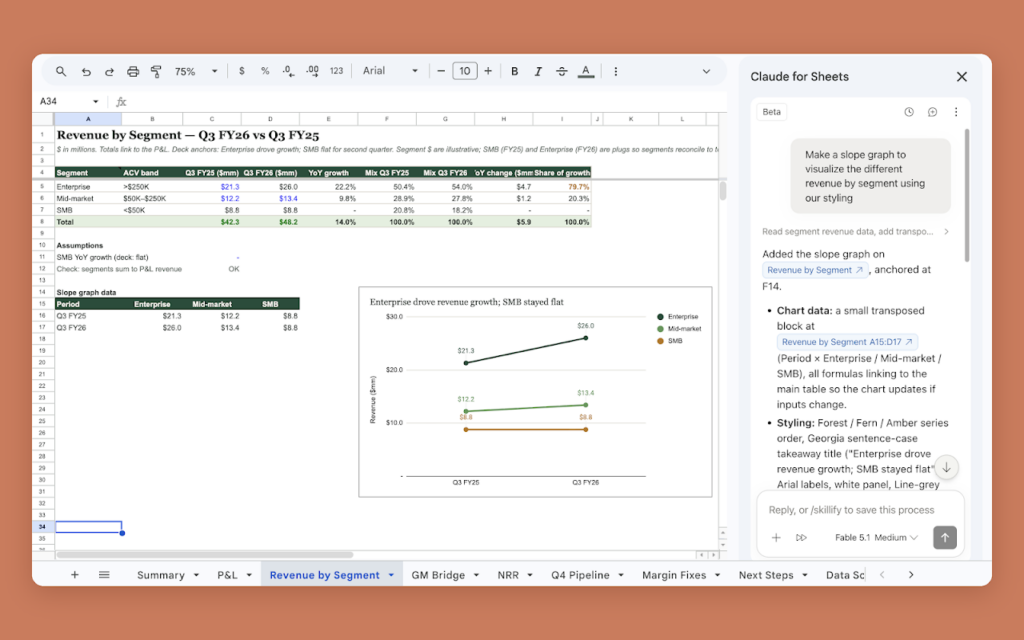
For analysts and finance professionals, the ability to work through a complicated model and explain its logic can be particularly valuable.
Gemini’s Spreadsheet Capabilities
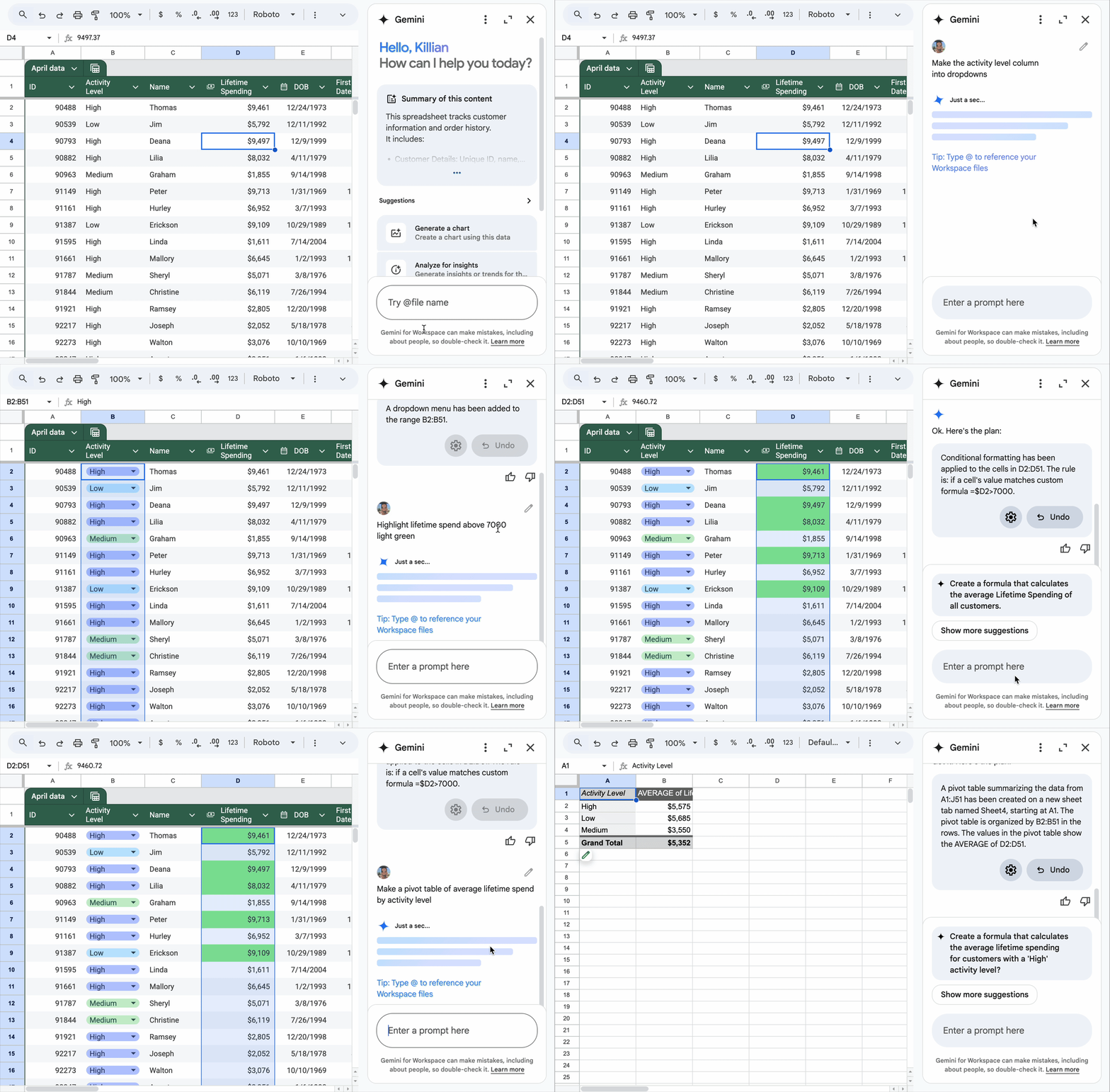
Gemini supports a broad range of native Google Sheets operations. Its documented features include:
- Generating formulas and tables
- Analyzing spreadsheet data
- Creating charts and graphs
- Building pivot tables
- Applying conditional formatting
- Adding dropdowns and checkboxes
- Managing filters and table formatting
- Helping with optimization tasks
- Summarizing relevant information from Drive and Gmail
This makes Gemini useful for everyday spreadsheet work, especially when the task involves both data manipulation and information stored elsewhere in Workspace.
Our verdict for Google Sheets: There is no clear winner for every task. Claude is worth testing for model-building, formula troubleshooting, and more involved data transformations. Gemini is a strong option for native spreadsheet operations and tasks that depend on information from other Google services.
For important financial or business calculations, review the formulas and results regardless of which assistant you use.
Claude vs Gemini in Google Slides
Presentation creation is another area where Gemini has an advantage, particularly for users starting with a blank deck.
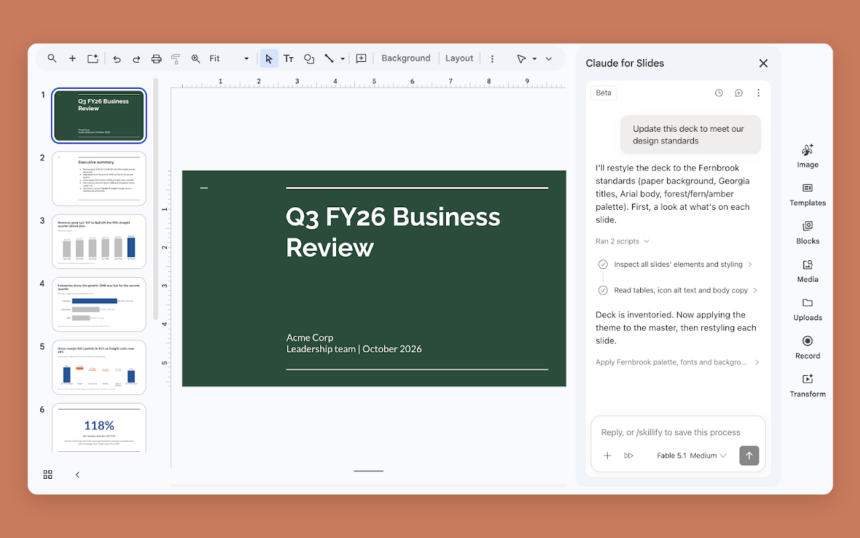
Claude for Google Slides
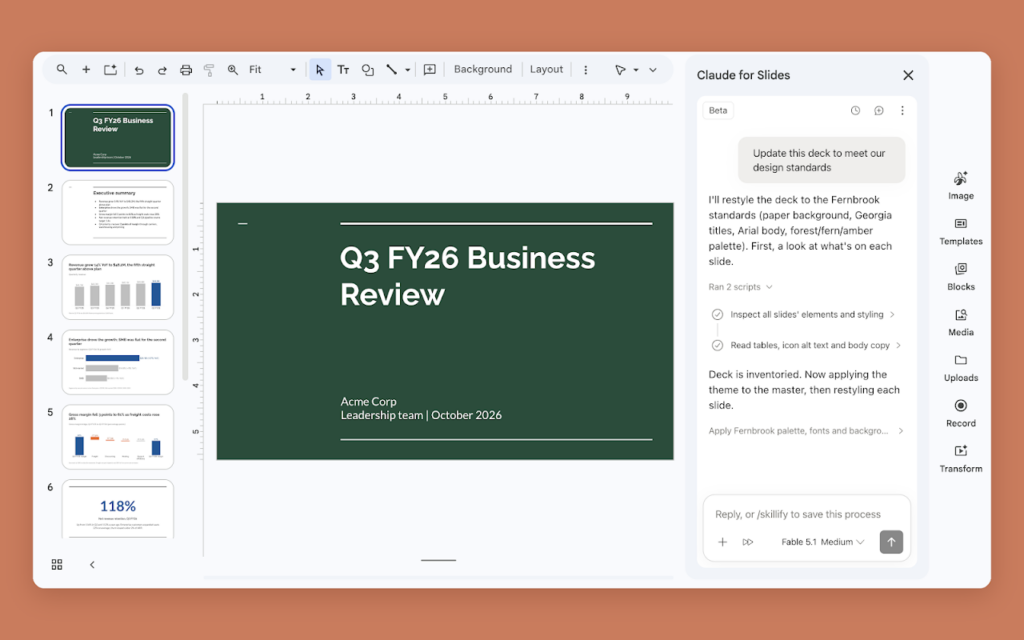
Claude can create slides, rewrite titles, split overcrowded slides into more manageable sections, and restyle an existing presentation. It can also generate charts.
However, Anthropic’s current beta documentation notes that new charts may be inserted as images rather than as linked Google Sheets charts. That can limit how easily users update the underlying data later.
Claude is therefore useful for improving an existing presentation or turning rough content into a more polished deck.
Gemini for Google Slides
Gemini can generate a presentation from a prompt and use reference files to guide the result. Users can refine their instructions before generation and continue editing the resulting slides.
Because the generated presentation remains editable, Gemini is a practical option for people who need to turn notes, source material, or existing documents into a structured presentation.
Our verdict for Google Slides: Gemini has the advantage for generating complete, editable presentations from prompts and reference files. Claude remains useful for rewriting, reorganizing, and refining individual slides or an existing deck.
Claude vs Gemini: Which AI Has Better Workspace Integration?
The most significant difference between the two assistants is how much information they can use beyond the file currently open.
Claude’s sidebar is designed to help you work directly in Docs, Sheets, and Slides. Its separate connectors can extend that workflow, but the available context depends on the integrations you have enabled.
Gemini benefits from being part of Google’s own productivity ecosystem. It can draw on relevant files, emails, and conversations when supported by the user’s plan and permissions.
Consider a simple example: you need to prepare a quarterly business report using sales figures, email updates, and notes from several meetings.
With Claude, you may need to provide the relevant information in the open file or connect to the services that contain it. Gemini can be a more convenient starting point when the source material already lives across Google Workspace.
That does not automatically make Gemini more accurate. It means the assistant may have a more direct route to the information needed for the task. Users should still check the sources, calculations, and claims included in the finished report.
Pricing and Availability
Claude for Google Workspace entered public beta on October 6 for eligible paid Claude plans. Availability and capabilities may change as Anthropic develops the integration.
Gemini is available through eligible Google Workspace and Google AI plans, with specific features depending on the subscription and account configuration.
Before choosing a service, check the terms of your existing plan. Access to an assistant’s basic features does not necessarily mean every integration or advanced capability is included.
Businesses should also confirm administrator settings, data-access permissions, and any restrictions on connecting third-party AI tools to company documents.
If your organization already pays for Google Workspace features that include Gemini, it makes sense to evaluate those capabilities before adding another subscription. Claude may still be worth the additional cost if your team already relies on it for writing, analysis, or other AI-assisted work.
My Opinion: Claude Is the Editor, Gemini Is the Workspace Assistant
In my view, Claude and Gemini are most useful when you stop treating them as interchangeable chatbots and start looking at the work each can take off your plate.
Claude’s biggest appeal is focused editing. If I already have a long report open and need to restructure it, improve the wording, fix confusing sections, or work through a complicated spreadsheet, Claude is worth having available in the sidebar. Its approval controls also make sense for people who want to inspect changes before accepting them.
Gemini looks more useful when the task begins before the document exists. If I need to collect information from emails, locate relevant files, turn that material into a report, and then build a presentation, then its integration with Google Workspace is a practical advantage. Having fewer manual steps between source material and the finished document can save more time than a slightly better rewrite.
I would not pay for a second AI subscription simply because Claude is now available inside Google apps. If Gemini already handles your everyday tasks well, the new integration alone is not a compelling reason to switch. Conversely, people who already use Claude regularly may find the sidebar a convenient way to work without repeatedly copying content between applications.
My recommendation is to test both assistants on the same three tasks: rewrite a real document, analyze a spreadsheet with several formulas, and create a presentation from source material. Compare the accuracy, formatting, amount of manual correction, and time required to finish each task.
That will tell you more about their value to your workflow than a generic feature checklist.
Claude vs Gemini in Google Workspace: Final Verdict
Gemini is the stronger default for users who rely heavily on Google Workspace and need an assistant that can draw context from multiple Google services. Its ability to work with relevant files, emails, and other sources gives it an advantage for research, document creation, and presentation workflows.
Claude is worth considering for users who prefer its writing and analysis capabilities and want to apply them directly to Google documents, spreadsheets, and presentations. Its editing approval options are also useful for people who want more direct control over changes.
Neither assistant is the best choice for every job, and both have limitations that matter in specific workflows.
For most Google Workspace users, start by testing Gemini with the tools already available through your plan. If Claude can produce noticeably better results on the work you do most often, its new Workspace integration gives you a stronger reason to consider it.
The best choice is the assistant who produces accurate, usable work with the fewest corrections, not simply the one with the longer feature list.