Getting too many promotional notifications from DoorDash on your iPhone? You’re not the only one. While delivery updates are useful, constant alerts about discounts, restaurant deals, reminders, and product announcements can quickly become overwhelming.
The good news is that you don’t have to disable DoorDash notifications completely. Instead, you can turn off only the marketing and promotional alerts while continuing to receive important notifications about your orders.
Here’s how to stop DoorDash promotional notifications on your iPhone.
Why You’re Receiving So Many DoorDash Notifications
Like many apps, DoorDash uses push notifications to promote special offers, featured restaurants, limited-time discounts, and new features. These marketing alerts are enabled by default for many users.
If you disable DoorDash notifications from the iPhone’s Settings > Notifications menu, you’ll also stop receiving delivery updates, driver messages, and order status notifications. That’s why it’s better to manage these settings directly within the DoorDash app.
How to Turn Off DoorDash Promotional Notifications
Follow these steps to disable marketing notifications while keeping essential order updates enabled.
- Open the DoorDash app on your iPhone.
- Tap your Profile icon.
- Open Settings.
- Select Notifications.
- Turn off the following notification categories:
- Store Offers
- DoorDash Offers
- Recommendations
- Reminders
- Product Updates & News
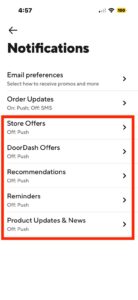
Leave Order Updates enabled if you still want to receive notifications about deliveries, driver arrivals, and order status.
Once these settings are disabled, DoorDash will stop sending most promotional push notifications while continuing to notify you about active orders.
Keep Order Updates Enabled
The Order Updates option controls the notifications that matter most, including:
- Order confirmation
- Restaurant preparation updates
- Driver pickup notifications
- Delivery status
- Arrival alerts
Disabling this setting could mean you miss important updates about your current orders, so it’s recommended to leave it turned on.
Why You Shouldn’t Disable Notifications From iPhone Settings
Although you can block DoorDash notifications entirely through iOS by going to:
Settings > Notifications > DoorDash
doing so prevents every notification from appearing, including delivery alerts and messages from your driver.
Managing notification preferences inside the DoorDash app gives you much more control by allowing you to filter out advertising while keeping essential order notifications.
Can You Stop DoorDash Marketing Emails Too?
If you’re also receiving promotional emails from DoorDash, you can unsubscribe by opening any marketing email and selecting the Unsubscribe link at the bottom. Alternatively, visit your DoorDash account settings and adjust your email communication preferences if the option is available.
DoorDash’s promotional notifications can quickly clutter your iPhone’s Notification Center, but you don’t have to disable the app entirely.
By turning off marketing categories such as offers, recommendations, reminders, and product updates while leaving Order Updates enabled, you can continue receiving important delivery notifications without the constant stream of promotional alerts.