Two-factor authentication is an important layer of account security, but retrieving a verification code from an email can be surprisingly tedious. Google is now making that process faster with a small Gmail update that lets users copy certain 2FA codes directly from the inbox.
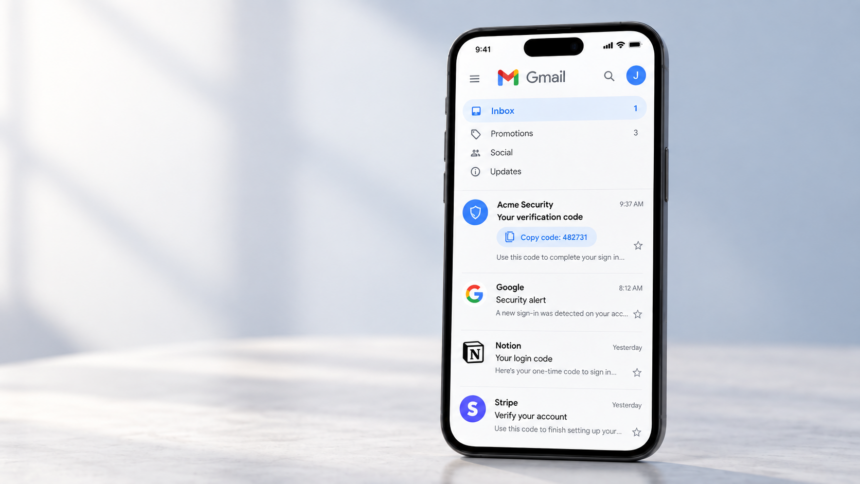
Instead of opening an email, finding the six-digit code and copying it manually, Gmail can now detect the verification code and place a dedicated copy button directly beneath the message subject.
Gmail Adds a One-Tap 2FA Code Button
The new feature appears as a pill-shaped button on supported verification emails. When Gmail recognizes an authentication code, it displays an option similar to “Copy code: 000000” in the inbox.
Tapping the button immediately copies the code to the device’s clipboard, allowing users to paste it into the website or application requesting verification.
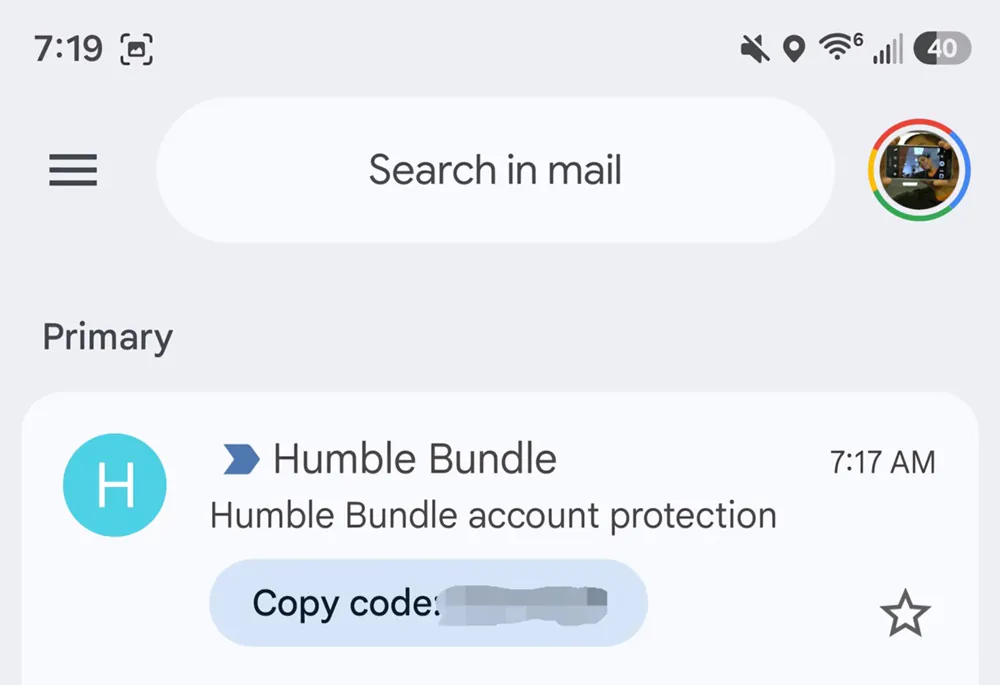
The shortcut appears in the same general area where Gmail displays contextual actions and attachments, keeping the feature accessible without requiring users to open the message.
Initial reports indicate that Gmail can recognize verification messages from different types of services, including emails sent by banks and online stores.
The Feature Is Available on Android and iPhone
For now, the shortcut is being rolled out to Gmail’s mobile applications.
Reports indicate that it is appearing in Gmail version 2026.09.07.x on Android and version 6.0.260907 on iOS.
The Gmail web interface does not currently offer the same option. Desktop users therefore still need to open a verification email and manually retrieve the code.
While the change is relatively small, it could make a noticeable difference for people who use email-based two-factor authentication regularly.
Google Is Reducing the Friction Around 2FA
Google has been gradually making one-time authentication codes easier to use across its platforms.
Android can already detect certain verification codes received through SMS, while mobile operating systems can automatically suggest one-time codes when a login form requests them. Gmail’s new shortcut applies the same basic idea to codes delivered through email.
The feature does not change how two-factor authentication works or make the codes themselves more secure. Instead, it removes several unnecessary steps from the process.
Two-factor authentication remains an important defence against compromised passwords, although the industry is increasingly moving toward passkeys, which can authenticate users without requiring traditional one-time codes. Google already supports passkeys as an alternative within its account security options.
For Gmail users who still rely on emailed verification codes, however, the new shortcut offers a simple improvement: the code is ready to copy before the message is even opened.