Microsoft Dynamics 365 has been evolving steadily, but its recent updates represent a meaningful shift in how businesses can actually use ERP and CRM software day to day. The changes are not cosmetic. They touch three areas that matter most to operations teams: AI-assisted work via Copilot, deeper process automation via Power Platform, and improved access to business data for decision-makers at every level.
For companies weighing whether to invest in this ecosystem, understanding what has changed and why it matters is a good place to start.
How Copilot Changes Day-to-Day Work in Dynamics 365
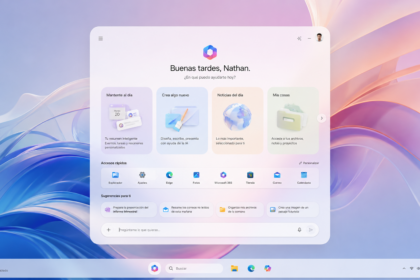
Copilot is Microsoft’s generative AI layer built directly into Dynamics 365, and it is designed to reduce the time employees spend on tasks that are necessary but not particularly rewarding. Think drafting emails, summarizing customer cases, pulling together reports, or flagging anomalies in data.
What makes it practical rather than theoretical is that it works inside the applications people already use. A sales rep does not need to switch tools or learn a new interface. Copilot surfaces recommendations and drafts content within the existing Dynamics workflow.
Some of the specific tasks it handles include:
- Generating email responses based on the context of a customer interaction
- Summarizing open support cases so agents can get up to speed quickly
- Providing predictive suggestions based on historical data
- Flagging patterns in sales pipelines or financial data that might otherwise go unnoticed
The honest caveat is that AI assistance is only as useful as the data it has access to, and companies with inconsistent or siloed data may not see the full benefit immediately. Getting the data foundation right tends to come before getting the most out of Copilot.
Process Automation Through Power Platform
The integration between Dynamics 365 and Power Platform has become tighter with recent updates, and Power Automate in particular has grown more capable. Workflows can now be built and customized at a granular level, allowing businesses to automate sequences of tasks that previously required manual handoffs between departments.
What is notable about the current iteration is that the platform has moved beyond simple if-then logic. It can now identify bottlenecks within a workflow and suggest adjustments, meaning automation improves over time rather than remaining static once it is set up.
For operations-heavy businesses, this is where the practical value often shows up first. Reducing manual steps in procurement, invoicing, or customer onboarding does not just save time. It also cuts down on the kind of small errors that compound into bigger problems later.
Data Access and Reporting for the Whole Organization
One of the persistent frustrations with enterprise software is that meaningful data tends to stay locked inside tools that only a small number of people know how to use well. Dynamics 365’s updated analytics capabilities are aimed at changing that.
The reporting tools now support interactive visualisations and real-time dashboards that do not require a data analyst to configure or interpret. Department heads and team leads can pull relevant information without filing requests to IT or waiting for a scheduled report to land in their inbox.
The practical impact breaks down across a few areas:
| Area | What It Does | Why It Matters |
|---|---|---|
| Operations | Interactive data visualization | Teams can spot issues in complex metrics without needing technical training |
| Strategy | Predictive analytics | Leaders can anticipate demand shifts or risk factors before they escalate |
| Day-to-day management | Real-time reporting | Decisions get made on current data, not last week’s numbers |
What to Keep in Mind Before Adopting These Features
The capabilities in Dynamics 365’s latest updates are genuinely useful, but rolling them out well requires more than a technical deployment. Teams that have not worked with AI-assisted tools before often push back on new workflows, not because the tools are bad, but because the immediate benefit is not obvious to them.
Companies that have had success with this kind of implementation tend to start with a specific pain point rather than a broad rollout. Picking one department or one workflow that is clearly broken, automating or improving that, and demonstrating a visible result tends to build more internal support than trying to transform everything at once.
Microsoft ERP specialists consistently point out that the technology is only one part of the equation. Understanding how a business actually operates, where the friction is, and what people genuinely need from their tools matters just as much as which features get turned on.