In a recent update, WhatsApp introduced an improved two-step verification feature designed to better protect users from fraud, scams, and unauthorised account access. As WhatsApp continues to expand its services-including in-app payment features like BHIM Payments-security has become more important than ever.
This additional verification layer helps ensure that only you can activate your WhatsApp account, even if someone else gains access to your phone number.
Two-step verification works by adding a six-digit PIN to your account. This PIN is required whenever your phone number is registered on a new device, making it much harder for scammers to take over your account. Even if someone manages to obtain your SIM card or verification code, they won’t be able to proceed without this PIN.
Below is a simple, step-by-step guide to help you enable two-step verification and strengthen your account security.
What Is Two-Step Verification on WhatsApp?
Two-step verification is an optional security feature that protects your account beyond the standard SMS verification. Once enabled, WhatsApp will occasionally ask you to confirm your six-digit PIN to make sure you remember it. This prevents unauthorised access and reduces the risk of account hijacking.
You can also add an email address to reset your PIN if you ever forget it. While adding an email is optional, it’s strongly recommended.
How to Enable Two-Step Verification on WhatsApp
Follow these steps to activate the feature:

- Open WhatsApp on your phone
- Tap the three-dot menu in the upper-right corner
- Go to Settings, then select Account
- Tap Two-Step Verification
- Select Enable
At this point, WhatsApp will prompt you to create your PIN.
Setting Up Your PIN and Recovery Email
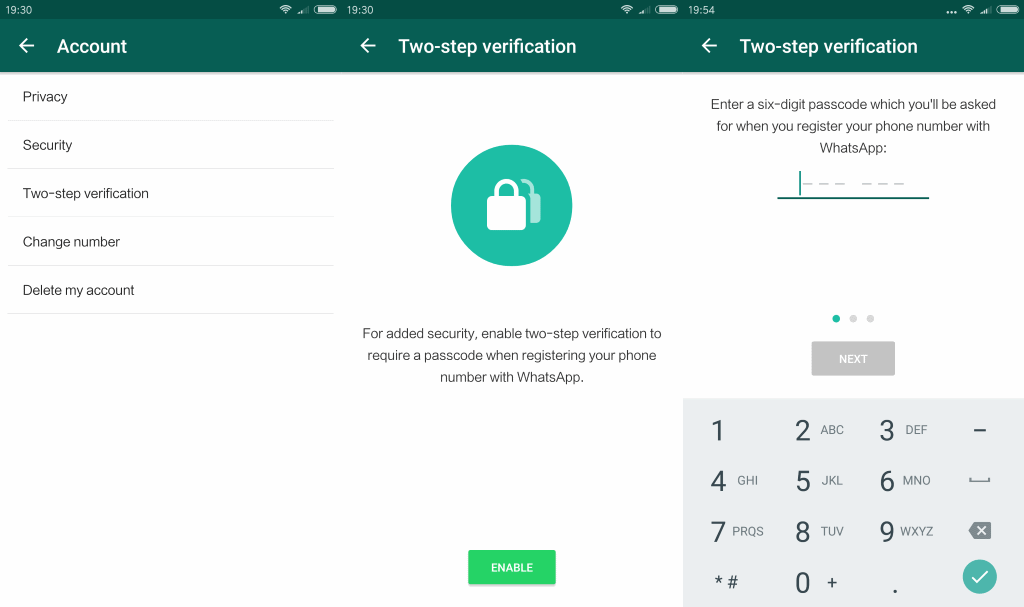
- Enter a six-digit PIN of your choice
- Avoid easy combinations like 123456 or your birth year
- Confirm the PIN by entering it again
- Add an email address (optional but recommended)
- This helps you recover your account if you forget the PIN
- Tap Done to complete the setup
Once these steps are finished, two-step verification will be active immediately.
Important Things to Keep in Mind
- WhatsApp will occasionally ask you to enter your PIN to help you remember it
- The PIN is required when registering your number on a new device
- If you skip adding an email and forget your PIN, account recovery can be difficult
- You can change or disable two-step verification anytime from Settings → Account
Enabling two-step verification is a quick process that significantly improves your account security. With scams and fraud attempts becoming more common, taking a few minutes to set up this feature can save you a lot of trouble in the future.